
Everything was working fine. Same cluster, same controller, same IRSA setup. Then you upgraded your node groups to Amazon Linux 2023 — and the AWS Load Balancer Controller started crashing with a 401 from EC2 metadata. Someone says “just set the hop limit to 2.” It works. But this post explains why that’s the wrong answer and what the right fix looks like.
The Error
unable to initialize AWS cloud: failed to introspect vpcID from EC2MetadataEC2MetadataError: failed to make EC2Metadata requeststatus code: 401, request id: ""
This error has nothing to do with your IAM policy or IRSA configuration. It’s a network-level problem rooted in how IMDSv2 works — and it’s triggered specifically by a change in defaults that Amazon Linux 2023 introduced.
Why It Worked Before on Amazon Linux 2
This is the most common source of confusion. Teams run this setup for months or years without issues, upgrade their node groups to AL2023, and suddenly the controller crashes. Nothing in the controller config changed. Nothing in IAM changed. So what happened?
The answer is in the default IMDS configuration that ships with each AMI:

AL2 shipped with HttpPutResponseHopLimit: 2 and HttpTokens: optional — meaning both IMDSv1 and IMDSv2 worked, and pods could reach IMDS across the extra network namespace hop. AL2023 ships with HttpTokens: required and HttpPutResponseHopLimit: 1 — the secure defaults AWS has been pushing toward for years.
You can verify what your nodes are currently running:
aws ec2 describe-instances \ --filters "Name=tag:eks:cluster-name,Values=<your-cluster>" \ --query 'Reservations[].Instances[].[InstanceId,MetadataOptions.HttpTokens,MetadataOptions.HttpPutResponseHopLimit]' \ --output table
On AL2 nodes you’ll see optional and 2. On AL2023 nodes you’ll see required and 1.
What Is IMDS and Why Does the Hop Limit Matter?
The Instance Metadata Service (IMDS) is a special HTTP endpoint at 169.254.169.254 available on every EC2 instance. It serves instance-specific data: IAM credentials, VPC ID, region, AMI ID, and more.
IMDSv2 introduced a session-oriented token flow to prevent SSRF attacks. The token has a TTL implemented as an IP hop limit — the packet’s TTL is set to the configured value and decrements by 1 at each network hop.
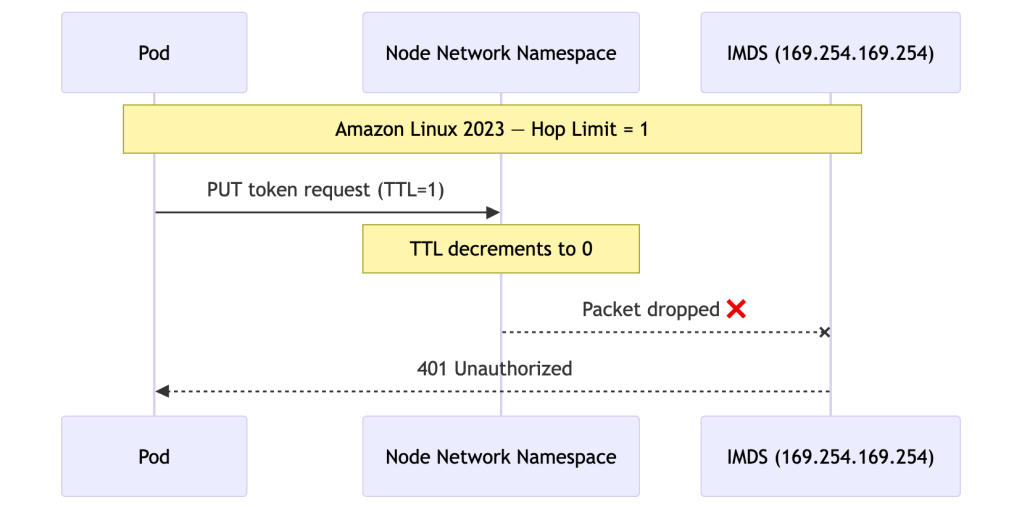
When a pod tries to reach IMDS, it traverses an extra network namespace — the node’s network stack — before reaching the endpoint. On AL2023 with hop limit 1, that extra hop consumes the only available TTL and the packet dies:
On AL2 with hop limit 2, the same request had enough TTL to survive the extra hop:
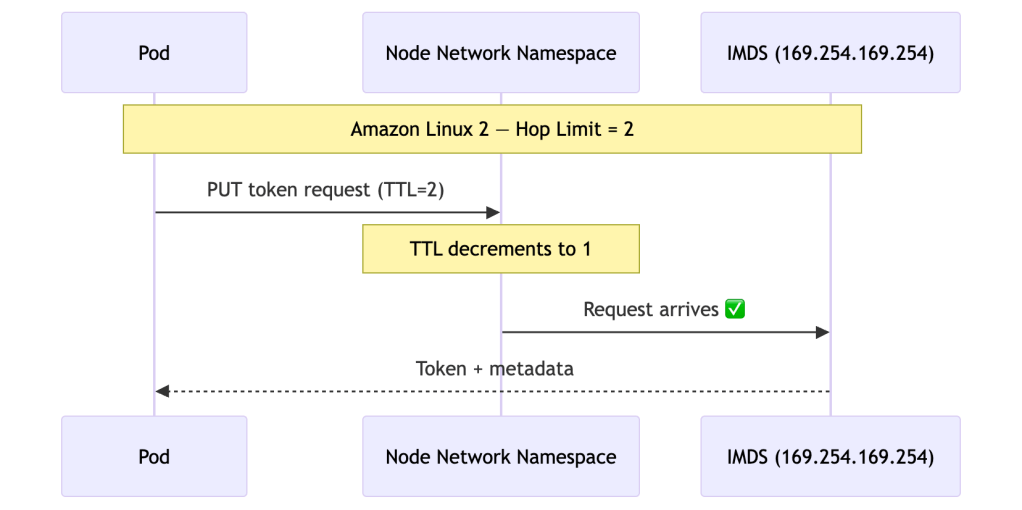
This is why the exact same controller config worked on AL2 and breaks on AL2023 — the network behaviour of IMDS changed under it.
The Two Things IMDS Is Used For
Even teams with IRSA correctly configured hit this crash. That’s because the controller uses IMDS for two completely separate purposes, and IRSA only addresses one of them:
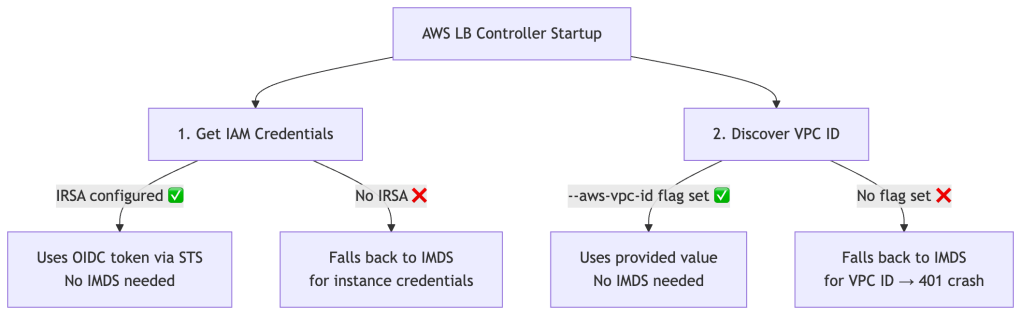
IRSA solves credential fetching only. The controller makes a completely separate IMDS call at startup to discover the VPC ID. This call hits a different metadata endpoint and has nothing to do with IAM. With IRSA set up but no --aws-vpc-id passed, the startup sequence on AL2023 looks like this:
1. Get credentials → via IRSA ✅ works fine2. Get VPC ID → via IMDS ❌ 401, hop limit = 13. Crash
This worked silently on AL2 because hop limit 2 let the VPC ID call through. AL2023 closed that door.
The Tempting Fix — And Why It’s Wrong
The obvious workaround is to set the hop limit back to 2, restoring the AL2 behaviour:
# Resist the urge — do not do thisaws ec2 modify-instance-metadata-options \ --instance-id <id> \ --http-put-response-hop-limit 2 \ --http-tokens required
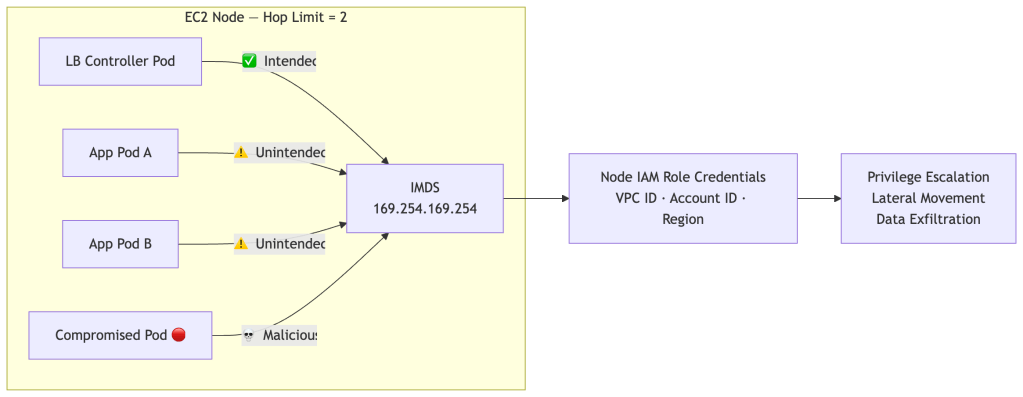
It works immediately. But setting HttpPutResponseHopLimit: 2 makes IMDS reachable from every pod on every node in your cluster — not just the load balancer controller:
The Attack Chain
If any pod on your node is compromised — through a supply chain attack, a vulnerable dependency, or a misconfigured workload — an attacker can steal the node’s IAM identity:
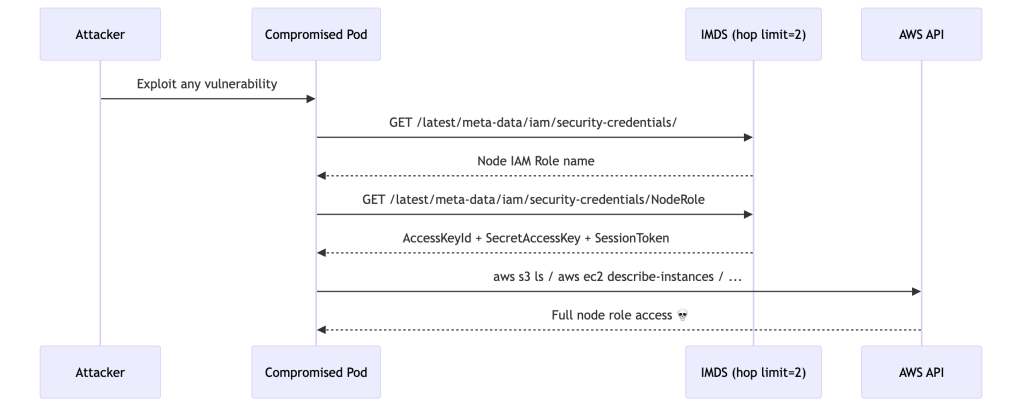
The attacker gains a valid AWS identity scoped to the node’s IAM role — typically far more permissioned than any individual workload needs. This attack vector is well-documented and actively exploited. It’s precisely why AWS made hop limit 1 the default in AL2023.
By setting hop limit back to 2, you’d be upgrading to a more secure OS and then immediately reverting its most important security default.
The Right Fix
The correct solution is to remove the IMDS dependency entirely. Two things need to be in place:
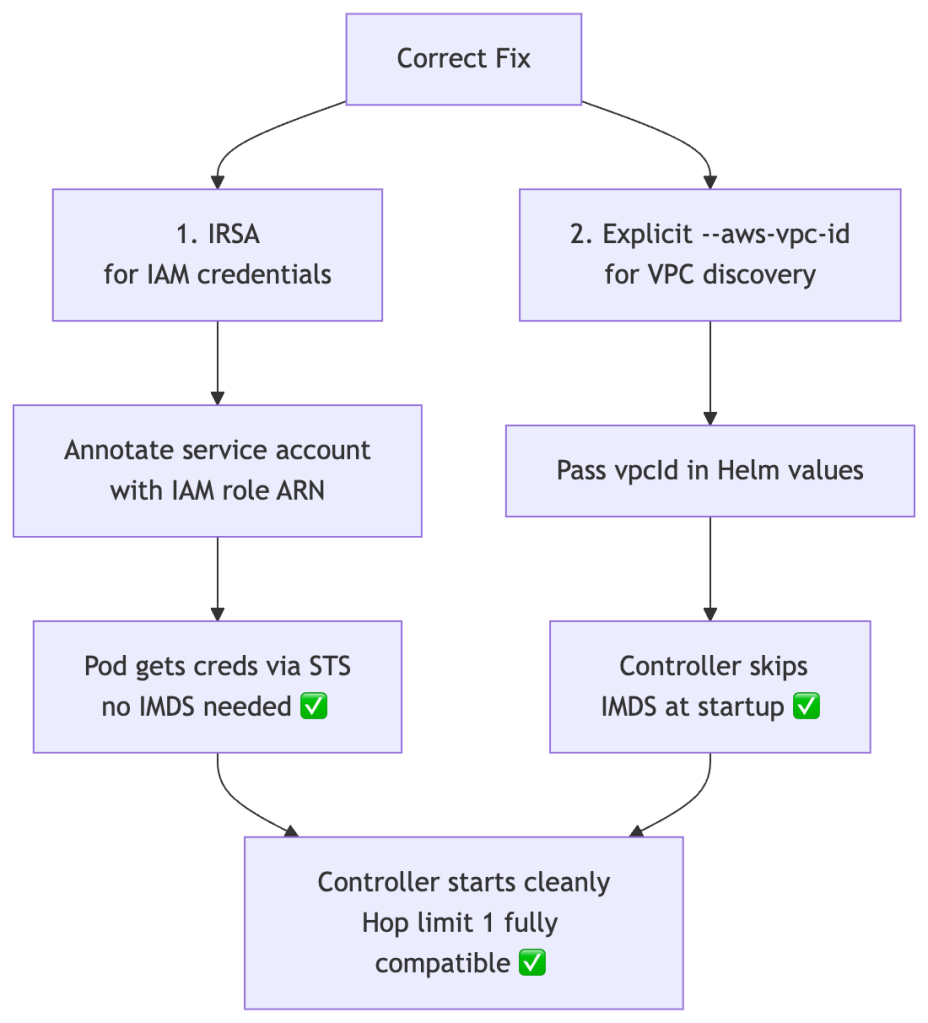
Part 1 — IRSA (if not already configured)
# Associate OIDC provider with your clustereksctl utils associate-iam-oidc-provider \ --cluster <your-cluster> \ --approve# Create the IAM role and annotated service accounteksctl create iamserviceaccount \ --cluster=<your-cluster> \ --namespace=kube-system \ --name=aws-load-balancer-controller \ --attach-policy-arn=arn:aws:iam::<account-id>:policy/AWSLoadBalancerControllerIAMPolicy \ --override-existing-serviceaccounts \ --approve
Verify the annotation is present:
kubectl describe sa aws-load-balancer-controller -n kube-system | grep role-arn# Annotations: eks.amazonaws.com/role-arn: arn:aws:iam::<account-id>:role/<role-name>
Part 2 — Pass the VPC ID explicitly
Get your VPC ID:
aws eks describe-cluster \ --name <your-cluster> \ --query 'cluster.resourcesVpcConfig.vpcId' \ --output text
Pass it to the Helm chart:
helm upgrade aws-load-balancer-controller eks/aws-load-balancer-controller \ -n kube-system \ --set clusterName=<your-cluster> \ --set serviceAccount.create=false \ --set serviceAccount.name=aws-load-balancer-controller \ --set vpcId=<your-vpc-id>
Or in values.yaml:
clusterName: my-clustervpcId: vpc-xxxxxxxxxxxxxxxxxserviceAccount: create: false name: aws-load-balancer-controller
With both in place, the controller never touches IMDS. Hop limit 1 and HttpTokens: required are fully compatible.
Verifying the Fix
# Controller pod should be Running with no restartskubectl get pods -n kube-system -l app.kubernetes.io/name=aws-load-balancer-controller# Logs should show clean startup — no metadata errorskubectl logs -n kube-system \ -l app.kubernetes.io/name=aws-load-balancer-controller \ | grep -E "error|vpc|metadata"# Confirm node IMDS settings remain locked downaws ec2 describe-instances \ --filters "Name=tag:eks:cluster-name,Values=<your-cluster>" \ --query 'Reservations[].Instances[].[InstanceId,MetadataOptions.HttpTokens,MetadataOptions.HttpPutResponseHopLimit]' \ --output table# Should show: required | 1 ✅
Decision Tree
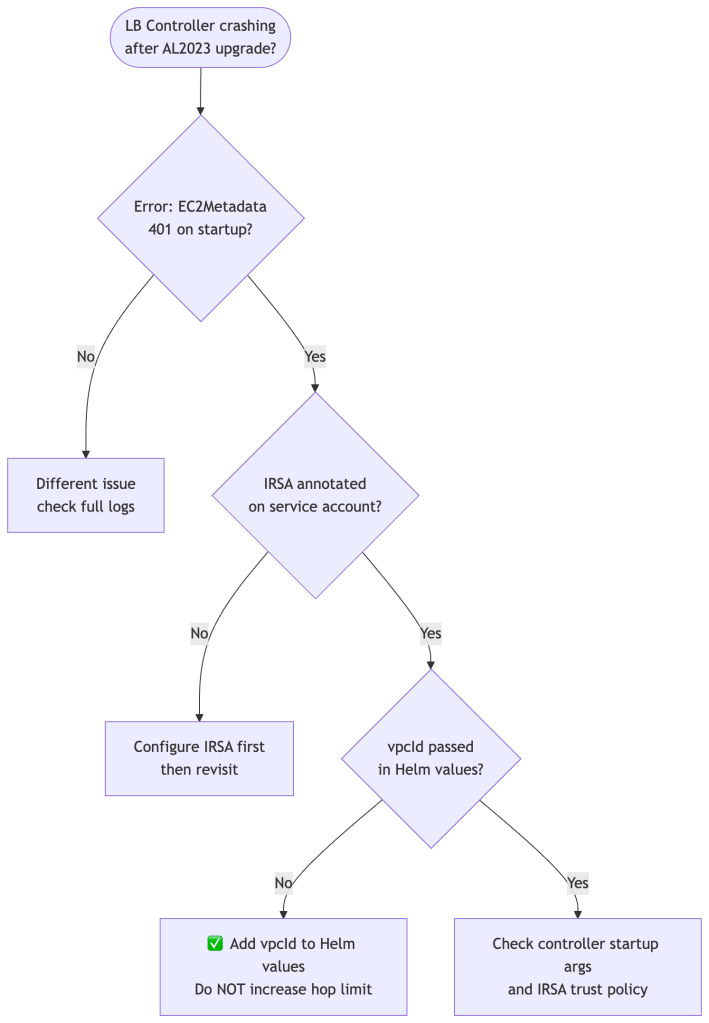
Summary
| Approach | Fixes Crash | Removes IMDS Dependency | Secure | Recommended |
|---|---|---|---|---|
| Increase hop limit to 2 | ✅ | ❌ Still depends on IMDS | ❌ All pods reach IMDS | ❌ No |
| IRSA only, no vpcId | ❌ | ❌ Partial | ✅ | ❌ Incomplete |
IRSA + --aws-vpc-id | ✅ | ✅ Fully eliminated | ✅ | ✅ Yes |
AL2023 didn’t break your setup — it revealed that your setup was depending on a security gap that AL2 had open by default. The fix isn’t to reopen that gap. It’s to remove the dependency that made it necessary in the first place.
The principle: infrastructure facts like VPC ID should be injected at deploy time, not fetched at runtime from a shared metadata endpoint that every pod on the node can reach.
For further reading: the EKS Best Practices Guide on IAM covers IRSA, Pod Identity, and IMDS hardening in depth.
 Platformwale
Leave a comment