
The Challenge: IAM Role Proliferation in Multi-Tenant Architectures
When building multi-tenant Kubernetes applications that require AWS resource access, teams traditionally face a difficult choice: either create separate IAM roles for each tenant (leading to IAM role sprawl) or implement complex application-level access controls. With AWS’s default limit of 1,000 IAM roles per account, this becomes a critical scalability bottleneck for platforms serving hundreds or thousands of tenants.
Consider a typical multi-tenant SaaS platform running on Amazon EKS where each tenant needs isolated access to S3 storage. Using the traditional IRSA (IAM Roles for Service Accounts) approach, you would need:
- One IAM role per tenant for S3 access
- Separate service accounts for each tenant
- Individual IRSA annotations on each service account
- Complex role management as tenants are added or removed
For a platform with 500 tenants, this means managing 500+ IAM roles just for S3 access alone—consuming half of your account’s IAM role quota before considering any other AWS services or infrastructure needs.
The Solution: EKS Pod Identity with Shared IAM Roles
EKS Pod Identity, introduced in late 2023, fundamentally changes this equation. Instead of requiring one IAM role per tenant, you can use a single shared IAM role for all tenants while maintaining strict security isolation through namespace-based access controls.
How It Works
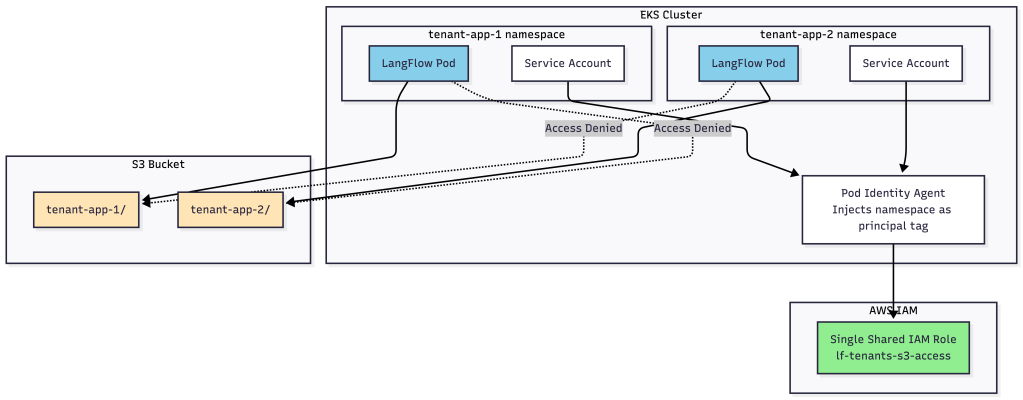
The key innovation is the automatic injection of principal tags by the Pod Identity agent. When a pod assumes an IAM role through Pod Identity, AWS automatically adds the pod’s namespace as a principal tag (kubernetes-namespace). This tag can then be used in IAM and S3 bucket policies to enforce tenant isolation at the AWS policy level.
Here’s the architecture:
The IAM Policy Magic
The shared IAM role uses the ${aws:PrincipalTag/kubernetes-namespace} variable to dynamically scope permissions based on the pod’s namespace:
{
  "Version": "2012-10-17",
  "Statement": [
    {
      "Sid": "ListBucketByNamespacePrefix",
      "Effect": "Allow",
      "Action": "s3:ListBucket",
      "Resource": "arn:aws:s3:::my-tenant-bucket",
      "Condition": {
        "StringLike": {
          "s3:prefix": "${aws:PrincipalTag/kubernetes-namespace}/*"
        }
      }
    },
    {
      "Sid": "ReadWriteInNamespaceFolder",
      "Effect": "Allow",
      "Action": [
        "s3:GetObject",
        "s3:PutObject",
        "s3:DeleteObject"
      ],
      "Resource": "arn:aws:s3:::my-tenant-bucket/${aws:PrincipalTag/kubernetes-namespace}/*"
    }
  ]
}
When a pod in the tenant-app-1 namespace assumes this role, the ${aws:PrincipalTag/kubernetes-namespace} variable automatically resolves to tenant-app-1, restricting access to only the tenant-app-1/ prefix in the S3 bucket.
The Scalability Comparison
Visual Comparison: IAM Role Growth
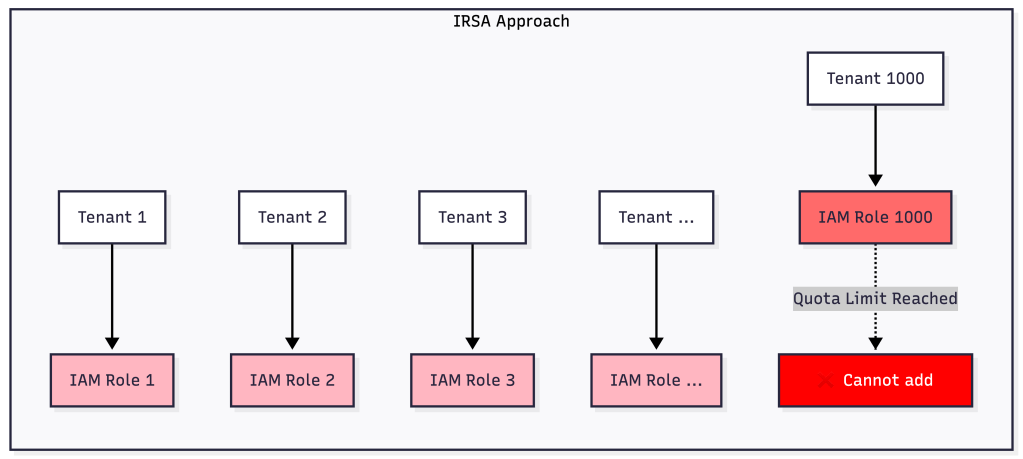

Traditional IRSA Approach
| Tenants | IAM Roles Required | % of Account Quota Used |
|---|---|---|
| 100 | 100+ | 10% |
| 500 | 500+ | 50% |
| 1,000 | 1,000+ | 100% (quota limit) |
| 2,000 | ❌ Not possible | ❌ Exceeds quota |
Challenges:
- Linear growth in IAM roles with tenant count
- Complex role lifecycle management
- Service account annotation overhead
- Quota exhaustion at scale
- Difficult to audit and maintain
EKS Pod Identity Approach
| Tenants | IAM Roles Required | % of Account Quota Used |
|---|---|---|
| 100 | 1 | 0.1% |
| 500 | 1 | 0.1% |
| 1,000 | 1 | 0.1% |
| 10,000 | 1 | 0.1% |
Benefits:
- Constant IAM role count regardless of tenant count
- Simplified role management
- No service account annotations needed for tenants
- Scales to tens of thousands of tenants
- Centralized policy management
Defense-in-Depth Security
While using a shared IAM role might initially seem less secure, the implementation actually provides defense-in-depth through multiple security layers:
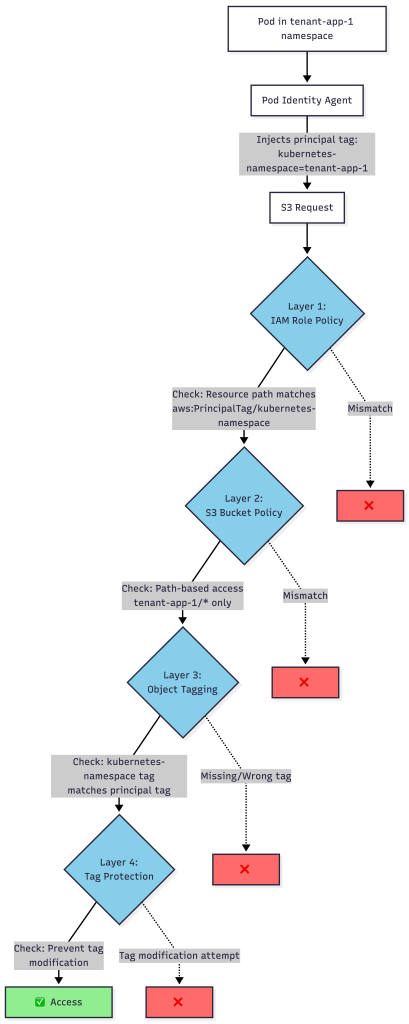
Layer 1: IAM Role Policy
The IAM role policy uses principal tags to restrict resource access patterns:
- Pods can only list objects with their namespace prefix
- Object operations are scoped to namespace/* paths
- Upload operations require matching namespace tags
Layer 2: S3 Bucket Policy
The S3 bucket policy mirrors the IAM restrictions at the bucket level:
- Provides protection even if IAM roles are misconfigured
- Enforces path-based access controls
- Validates namespace tags on all operations
Layer 3: Mandatory Object Tagging
All uploaded objects must include a kubernetes-namespace tag matching the principal tag:
{
  "Sid": "PutObjectWithNamespaceTag",
  "Effect": "Allow",
  "Action": "s3:PutObject",
  "Resource": "arn:aws:s3:::bucket/${aws:PrincipalTag/kubernetes-namespace}/*",
  "Condition": {
    "StringEquals": {
      "s3:RequestObjectTag/kubernetes-namespace": "${aws:PrincipalTag/kubernetes-namespace}"
    }
  }
}
Layer 4: Tag Modification Prevention
Explicit deny policies prevent post-upload tag modifications to prevent namespace spoofing:
{
  "Sid": "DenyPostUploadTagModification",
  "Effect": "Deny",
  "Action": "s3:PutObjectTagging",
  "Resource": "arn:aws:s3:::bucket/${aws:PrincipalTag/kubernetes-namespace}/*",
  "Condition": {
    "Null": {
      "s3:ExistingObjectTag/kubernetes-namespace": "false"
    }
  }
}
Real-World Implementation
Here’s what tenant isolation looks like in practice:
Allowed Operations (Pod in tenant-app-1 namespace)
# List objects in own namespace
aws s3 ls s3://my-bucket/tenant-app-1/

# Upload with proper namespace tag
aws s3 cp file.txt s3://my-bucket/tenant-app-1/file.txt \
  --tagging "kubernetes-namespace=tenant-app-1"

# Download from own namespace
aws s3 cp s3://my-bucket/tenant-app-1/file.txt ./downloaded.txt

# Delete from own namespace
aws s3 rm s3://my-bucket/tenant-app-1/file.txt
Blocked Operations (Automatic Denial)
# Cannot access other tenant's data
aws s3 ls s3://my-bucket/tenant-app-2/
# Error: Access Denied

# Cannot upload without proper tag
aws s3 cp file.txt s3://my-bucket/tenant-app-1/untagged.txt
# Error: Access Denied

# Cannot upload with wrong namespace tag
aws s3 cp file.txt s3://my-bucket/tenant-app-1/file.txt \
  --tagging "kubernetes-namespace=tenant-app-2"
# Error: Access Denied

# Cannot list bucket root
aws s3 ls s3://my-bucket/
# Error: Access Denied
Operational Benefits
Beyond the obvious scalability advantages, EKS Pod Identity provides significant operational improvements:
Simplified Tenant Onboarding

IRSA Approach:
- Create new IAM role for tenant
- Configure trust policy with OIDC provider
- Create service account with IRSA annotation
- Deploy tenant workload
- Verify IAM role assumption
Pod Identity Approach:
- Create namespace for tenant
- Create Pod Identity Association (one API call)
- Deploy tenant workload
- Automatic credential injection
Reduced Management Overhead
- No service account annotations needed for tenant workloads
- Centralized policy updates affect all tenants simultaneously
- Simplified auditing with single IAM role to monitor
- Easier compliance with consolidated access patterns
Cross-Account Support
The architecture supports cross-account S3 buckets seamlessly:
- IAM roles in EKS cluster account
- S3 bucket in separate storage account
- Automatic policy synchronization
- Multiple DataPlanes can share buckets
When to Use EKS Pod Identity vs IRSA
Use EKS Pod Identity When:
- ✅ Building multi-tenant platforms with many tenants
- ✅ Need to scale beyond hundreds of tenants
- ✅ Want simplified tenant lifecycle management
- ✅ Require namespace-based resource isolation
- ✅ Approaching IAM role quota limits
Stick with IRSA When:
- ⚠️ Need per-tenant IAM policy customization
- ⚠️ Require different AWS service access per tenant
- ⚠️ Have complex cross-account role assumption patterns
- ⚠️ Running on EKS clusters that don’t meet Pod Identity requirements (Kubernetes 1.24+ with supported platform versions)
Getting Started
To implement this pattern in your EKS cluster:
- Enable Pod Identity on your EKS cluster (EKS 1.24+)
- Create the shared IAM role with principal tag-based policies
- Configure S3 bucket policy with matching restrictions
- Create Pod Identity Associations linking namespaces to the IAM role
- Deploy tenant workloads with standard service accounts (no annotations)
The Pod Identity agent automatically handles credential injection and namespace tag propagation—no application code changes required.
Conclusion
EKS Pod Identity represents a paradigm shift in how we approach multi-tenant AWS resource access. By leveraging automatic principal tag injection and policy variables, teams can:
- Scale to thousands of tenants with a single IAM role
- Maintain strict security isolation through defense-in-depth policies
- Simplify operations with centralized policy management
- Avoid IAM quota limitations that constrain growth
For platforms serving hundreds or thousands of tenants, the choice is clear: EKS Pod Identity eliminates the IAM role proliferation problem while actually improving security through standardized, auditable access patterns.
The future of multi-tenant Kubernetes on AWS is not about creating more IAM roles—it’s about using smarter policies with fewer roles.
 Platformwale
Leave a comment