Working extensively with AWS credentials in Kubernetes this quarter revealed how often credential precedence causes configuration issues. While the AWS SDK’s credential chain is well-designed, understanding the priority order is crucial for production deployments. Here’s what I’ve learned.
The Problem Nobody Talks About
A recent incident illustrated this well: We configured IRSA for a microservice, validated it in staging, and deployed to production successfully. Two weeks later, an audit revealed the service was using broader IAM permissions than expected. The cause was an AWS_ACCESS_KEY_ID environment variable in a Secret that was taking precedence over the IRSA configuration.
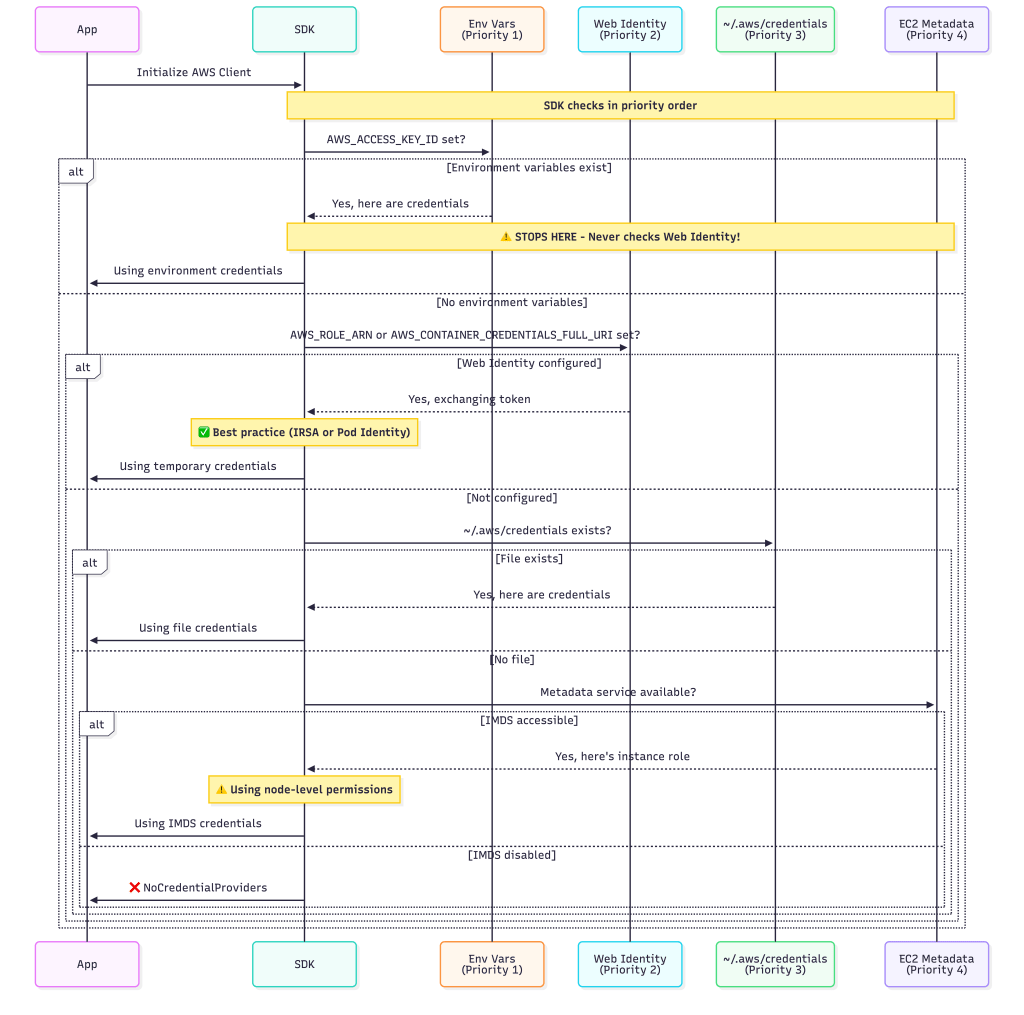
The SDK found credentials and stopped looking. It never even checked IRSA.
This is the #1 source of credential-related incidents I’ve seen in Kubernetes environments. The credential chain uses “first match wins” logic, and understanding this precedence is critical.
The Credential Chain: Priority Order
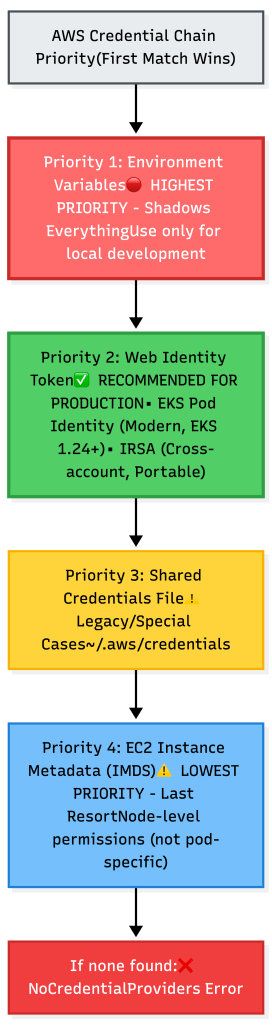
In most AWS SDKs, the default credential chain generally evaluates credentials in the following order, stopping at the first valid credentials:
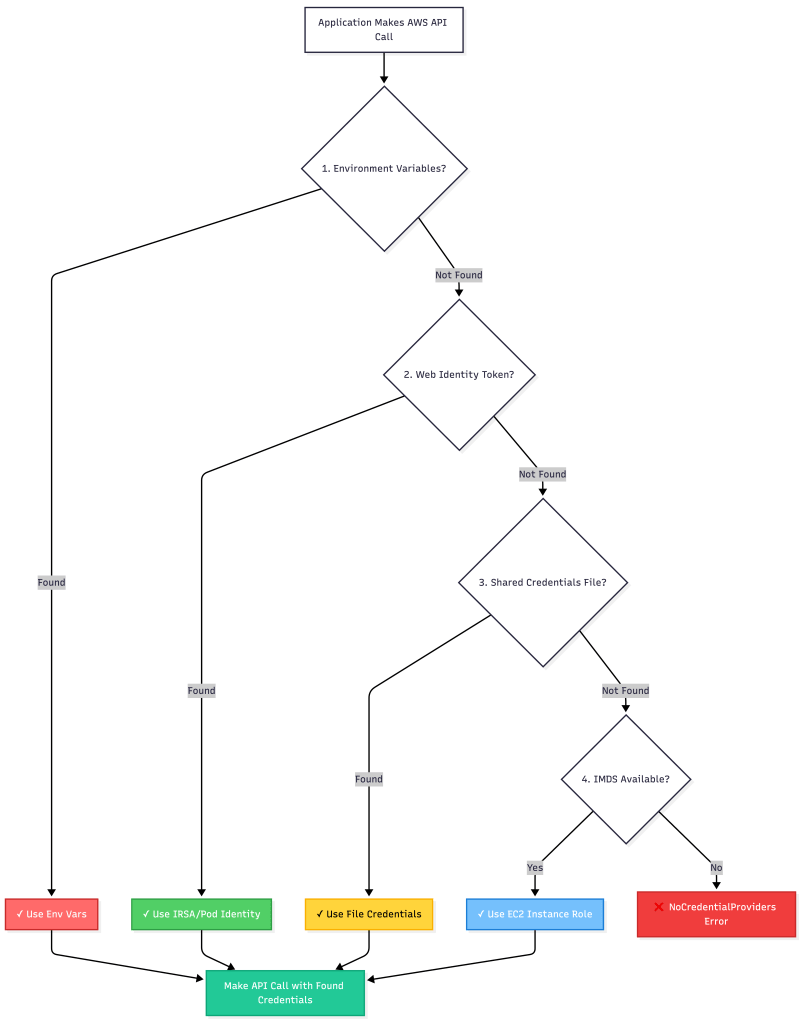
Key Insight: The SDK doesn’t validate permissions or check if credentials are appropriate—it just uses the first valid credentials it finds.
Why Precedence Matters: The Shadow Effect
When multiple credential sources exist, higher-priority sources “shadow” lower-priority ones:
The Four Credential Providers
1. Environment Variables (Highest Priority) 🔴
Environment Variables: AWS_ACCESS_KEY_ID, AWS_SECRET_ACCESS_KEY, AWS_SESSION_TOKEN
When to use: Local development, CI/CD pipelines where you control the environment completely.
When NOT to use: Production Kubernetes—too easy to accidentally commit or misconfigure.
Go Example:
// SDK automatically picks these up
cfg, err := config.LoadDefaultConfig(ctx)
// Will use env vars if present, regardless of IRSA/Pod Identity configuration!
Kubernetes Manifest (Anti-pattern):
spec:
  containers:
  - name: app
    env:
    - name: AWS_ACCESS_KEY_ID
      value: "AKIAI..."  # This shadows everything else!
The Shadow Problem: If these are set anywhere—in a ConfigMap, Secret, or Dockerfile—they will override all other credential sources.
2. Web Identity Token: IRSA vs EKS Pod Identity (Recommended) ✅
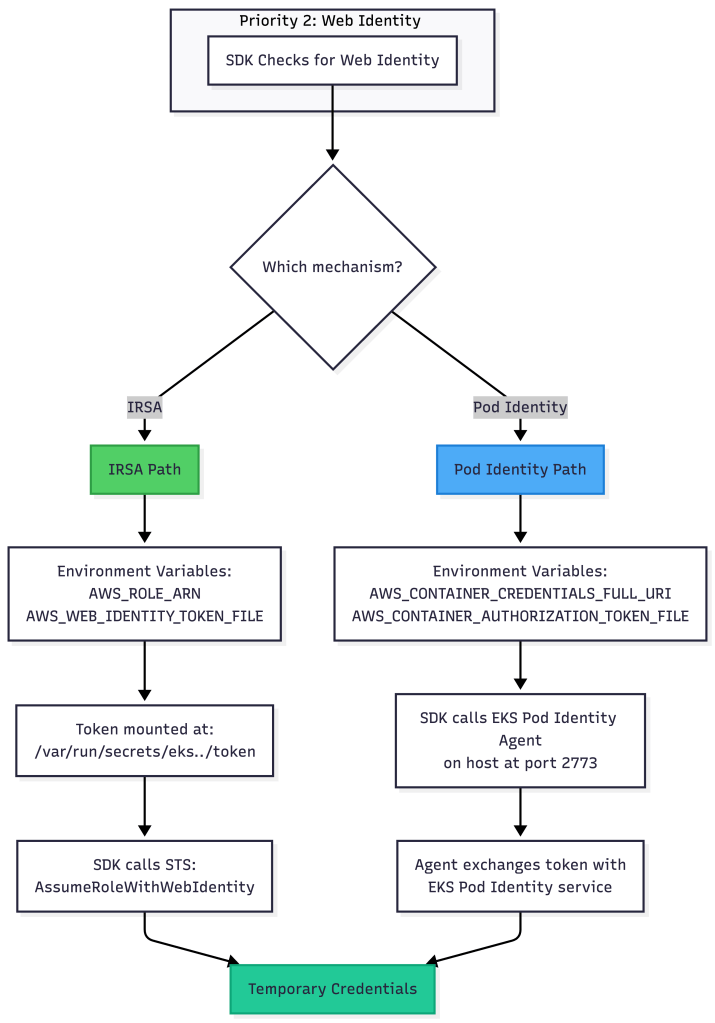
AWS provides two modern approaches for pod-level credentials in EKS. Both use the Web Identity Token provider in the credential chain, but they work differently under the hood.
Understanding the Two Approaches
IRSA (IAM Roles for Service Accounts) – The Original
How it works:
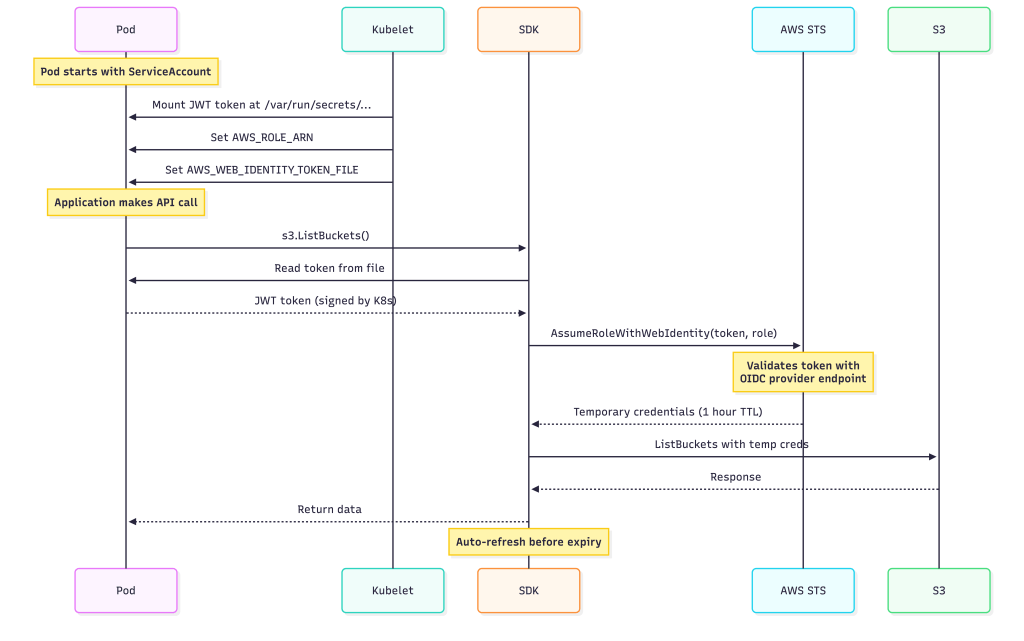
Setup Requirements:
- OIDC provider configured in IAM
- Service Account annotation
- IAM role with trust policy referencing OIDC provider
Configuration:
apiVersion: v1
kind: ServiceAccount
metadata:
  name: my-app-sa
  annotations:
    eks.amazonaws.com/role-arn: arn:aws:iam::123456789012:role/my-app-role
---
apiVersion: v1
kind: Pod
metadata:
  name: my-app
spec:
  serviceAccountName: my-app-sa
  containers:
  - name: app
    image: myapp:latest
What gets injected:
# Environment variables
AWS_ROLE_ARN=arn:aws:iam::123456789012:role/my-app-role
AWS_WEB_IDENTITY_TOKEN_FILE=/var/run/secrets/eks.amazonaws.com/serviceaccount/token

# Volume mount
/var/run/secrets/eks.amazonaws.com/serviceaccount/token (JWT, auto-refreshed)
Go Code:
// SDK automatically detects IRSA configuration
cfg, err := config.LoadDefaultConfig(ctx)
// SDK reads token and exchanges it transparently
Pros:
- ✅ Works across AWS accounts (cross-account assume role)
- ✅ OIDC standard, portable to other Kubernetes environments
- ✅ Fine-grained control with IAM trust policies
Cons:
- ⚠️ Requires OIDC provider setup (one-time per cluster)
- ⚠️ Trust policy can be complex for multi-tenant scenarios
- ⚠️ Token validation happens during credential refresh cycles, not on every AWS API call.
EKS Pod Identity – The New Standard
Introduced in late 2023, EKS Pod Identity simplifies credential management with a cluster add-on.
How it works:

Setup Requirements:
- EKS Pod Identity add-on installed on cluster
- Pod Identity association created (links ServiceAccount to IAM role)
- No customer-managed OIDC provider configuration is required.
Configuration:
# Create IAM role (standard role, no special trust policy needed)
aws iam create-role --role-name my-app-role --assume-role-policy-document '{
  "Version": "2012-10-17",
  "Statement": [{
    "Effect": "Allow",
    "Principal": {"Service": "pods.eks.amazonaws.com"},
    "Action": ["sts:AssumeRole", "sts:TagSession"]
  }]
}'

# Create Pod Identity association
aws eks create-pod-identity-association \
  --cluster-name my-cluster \
  --namespace default \
  --service-account my-app-sa \
  --role-arn arn:aws:iam::123456789012:role/my-app-role

# NEW (June 2025): Native cross-account support
# Specify both source and target role ARNs for cross-account access
aws eks create-pod-identity-association \
  --cluster-name my-cluster \
  --namespace default \
  --service-account my-app-sa \
  --role-arn arn:aws:iam::111111111111:role/source-account-role \
  --target-role-arn arn:aws:iam::222222222222:role/target-account-role
Kubernetes manifest (simpler!):
apiVersion: v1
kind: ServiceAccount
metadata:
  name: my-app-sa
  # No annotations needed!
---
apiVersion: v1
kind: Pod
metadata:
  name: my-app
spec:
  serviceAccountName: my-app-sa
  containers:
  - name: app
    image: myapp:latest
What gets injected:
# Environment variables (different from IRSA!)
AWS_CONTAINER_CREDENTIALS_FULL_URI=http://169.254.170.23/v1/credentials
AWS_CONTAINER_AUTHORIZATION_TOKEN_FILE=/var/run/secrets/pods.eks.amazonaws.com/serviceaccount/eks-pod-identity-token

# Volume mount
/var/run/secrets/pods.eks.amazonaws.com/serviceaccount/eks-pod-identity-token
Go Code (identical to IRSA):
// SDK automatically detects Pod Identity configuration
cfg, err := config.LoadDefaultConfig(ctx)
// SDK calls the Pod Identity agent transparently
Pros:
- ✅ Simpler setup (No customer-managed OIDC provider configuration is required)
- ✅ Pod Identity often results in lower latency because the SDK talks to a local agent, which handles STS interactions and caching on behalf of the pod.
- ✅ Better multi-tenant isolation
- ✅ Centralized association management
- ✅ Works with EKS versions 1.24+
- ✅ Native cross-account support (added June 2025) – automatic IAM role chaining with external ID for security
Cons:
- ⚠️ EKS-specific (not portable to other Kubernetes)
- ⚠️ Requires cluster add-on installation
IRSA vs Pod Identity: When to Use Which?
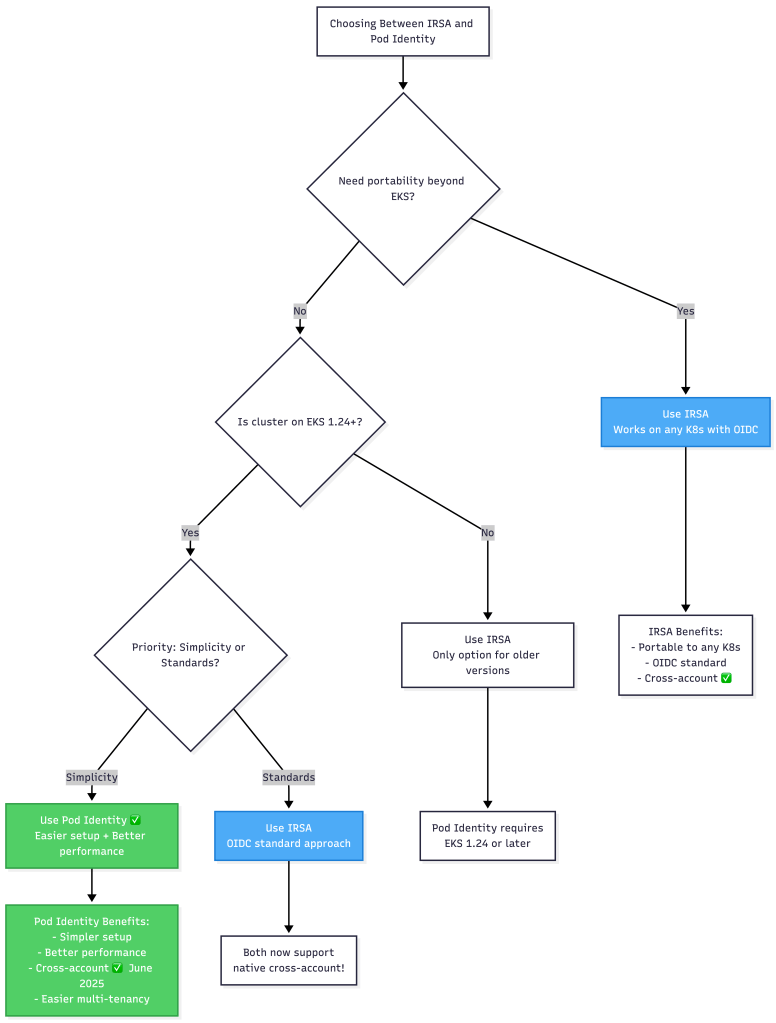
Decision Matrix:
| Criteria | IRSA | Pod Identity |
|---|---|---|
| Setup Complexity | Medium (OIDC provider) | Low (add-on) |
| Cross-Account Access | ✅ Yes | ✅ Yes (native as of June 2025) |
| Performance | Good (STS call) | Better (local agent) |
| EKS Version | Any | 1.24+ |
| Portability | High (OIDC standard) | Low (EKS only) |
| Multi-Tenancy | Manual (trust policy) | Built-in (associations) |
| Credential Refresh | STS via internet | Local agent |
My Recommendation:
- New EKS clusters (1.24+): Start with Pod Identity for simplicity and performance
- Existing IRSA deployments: No rush to migrate unless you hit issues
- Cross-account scenarios: Both IRSA and Pod Identity now support native cross-account access (Pod Identity added this in June 2025)
- High-traffic applications: Pod Identity for better performance
SDK Behavior with Both Approaches
The beauty is that from your application’s perspective, both are transparent:
package main

import (
    "context"
    "fmt"
    "os"
    "github.com/aws/aws-sdk-go-v2/config"
    "github.com/aws/aws-sdk-go-v2/service/s3"
)

func main() {
    ctx := context.Background()

    // SDK automatically detects either IRSA or Pod Identity
    cfg, err := config.LoadDefaultConfig(ctx)
    if err != nil {
        panic(err)
    }

    // Check which mechanism is being used (for debugging)
    creds, _ := cfg.Credentials.Retrieve(ctx)
    fmt.Printf("Credential Source: %s\n", creds.Source)

    // For IRSA: WebIdentityTokenProvider
    // Pod Identity: ContainerCredentialsProvider (SDK v2)
    // But different env vars under the hood

    if os.Getenv("AWS_CONTAINER_CREDENTIALS_FULL_URI") != "" {
        fmt.Println("Using: EKS Pod Identity")
    } else if os.Getenv("AWS_ROLE_ARN") != "" {
        fmt.Println("Using: IRSA")
    }

    // Use AWS services normally
    s3Client := s3.NewFromConfig(cfg)
    output, _ := s3Client.ListBuckets(ctx, &s3.ListBucketsInput{})
    fmt.Printf("Found %d buckets\n", len(output.Buckets))
}
3. Shared Credentials File
Location: ~/.aws/credentials (or AWS_SHARED_CREDENTIALS_FILE)
Format:
[default]
aws_access_key_id = AKIAI...
aws_secret_access_key = ...

[production]
aws_access_key_id = AKIAI...
aws_secret_access_key = ...
Use case: Multi-account scenarios, legacy migrations
Kubernetes pattern:
# Mount credentials file from ConfigMap/Secret
volumes:
- name: aws-creds
  secret:
    secretName: aws-credentials
volumeMounts:
- name: aws-creds
  mountPath: /root/.aws
  readOnly: true
Rarely needed in modern Kubernetes deployments where IRSA or Pod Identity is available.
4. EC2 Instance Metadata (IMDS) (Lowest Priority)
How it works: SDK queries the instance metadata service at http://169.254.169.254/latest/meta-data/
In Kubernetes context: Returns the EKS node’s IAM role, not pod-specific credentials.
The Problem:
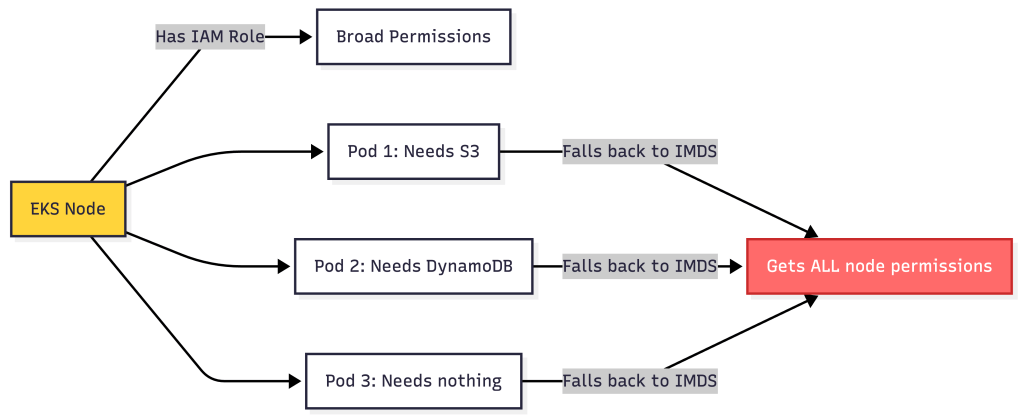
All pods on the node inherit the same permissions—violates least privilege.
Disable IMDS when using IRSA/Pod Identity:
env:
- name: AWS_EC2_METADATA_DISABLED
  value: "true"
Or use IMDSv2 with hop limit to prevent pod access (node-level configuration).
Common Precedence Mistakes
Mistake #1: The Silent Shadow
Setup:
# You configure IRSA or Pod Identity (good)
apiVersion: v1
kind: ServiceAccount
metadata:
  name: my-app-sa
  annotations:
    eks.amazonaws.com/role-arn: arn:aws:iam::123:role/restricted-role

---
# But your ConfigMap has this (bad)
apiVersion: v1
kind: ConfigMap
metadata:
  name: app-config
data:
  AWS_ACCESS_KEY_ID: "AKIAI..."  # Left over from testing
Result: App uses the ConfigMap credentials (full admin!), not IRSA/Pod Identity (restricted). No errors, no warnings—silent security violation.
Detection:
// Add this to your app initialization
creds, _ := cfg.Credentials.Retrieve(ctx)
if creds.Source != "WebIdentityTokenProvider" {
    log.Warnf("Expected Web Identity but got: %s", creds.Source)
}

// Or check the specific mechanism
if os.Getenv("AWS_ACCESS_KEY_ID") != "" {
    log.Error("Environment credentials are shadowing IRSA/Pod Identity!")
}
Mistake #2: Mixing IRSA and Pod Identity
Setup:
# ServiceAccount has IRSA annotation
apiVersion: v1
kind: ServiceAccount
metadata:
  annotations:
    eks.amazonaws.com/role-arn: arn:aws:iam::123:role/irsa-role

---
# But you also created a Pod Identity association via CLI
# aws eks create-pod-identity-association --service-account my-app-sa ...
What happens: Mixing IRSA and Pod Identity leads to undefined and SDK-dependent behavior and should be avoided.
Result: Confusion in debugging, potential permission mismatches.
Fix: Choose one mechanism per ServiceAccount and stick with it.
Mistake #3: The Typo Fallback
Setup:
apiVersion: v1
kind: ServiceAccount
metadata:
  annotations:
    eks.amazonaws.com/role-arn: arn:aws:iam::123:role/my-rol  # Missing 'e'!
What happens:
- Environment variables: ❌ Not set
- Web Identity (IRSA): ❌ Invalid role ARN, STS call fails
- Shared credentials: ❌ No file
- IMDS: Depending on SDK behavior and error handling, a failed Web Identity exchange may result in either an immediate failure or a fallback to the next provider (such as IMDS).
Result: App works but with wrong (usually over-privileged) permissions.
Mistake #4: Docker Image Pollution
# Dockerfile (bad practice)
FROM golang:1.21

# Someone added these during testing...
ENV AWS_ACCESS_KEY_ID=AKIAI...
ENV AWS_SECRET_ACCESS_KEY=...

COPY . .
RUN go build -o app
CMD ["./app"]
Result: Every pod using this image ignores IRSA/Pod Identity and uses hardcoded credentials.
Better approach:
FROM golang:1.21
COPY . .
RUN go build -o app

# No AWS credentials in image!
# Let Kubernetes inject them via IRSA/Pod Identity

CMD ["./app"]
Debugging Credential Chain Issues
Enhanced Diagnostic Tool
package main

import (
    "context"
    "fmt"
    "os"
    "github.com/aws/aws-sdk-go-v2/config"
    "github.com/aws/aws-sdk-go-v2/service/sts"
)

func main() {
    ctx := context.Background()

    fmt.Println("=== Credential Chain Status ===")

    // Check Priority 1: Environment Variables
    fmt.Println("\n1. Environment Variables:")
    if os.Getenv("AWS_ACCESS_KEY_ID") != "" {
        fmt.Println("   AWS_ACCESS_KEY_ID is set (shadows everything!)")
    } else {
        fmt.Println("   ✓ Not set")
    }

    // Check Priority 2: Web Identity (IRSA vs Pod Identity)
    fmt.Println("\n2. Web Identity Token:")

    if roleArn := os.Getenv("AWS_ROLE_ARN"); roleArn != "" {
        fmt.Printf("   ✓ IRSA configured\n")
        fmt.Printf("     Role: %s\n", roleArn)
        fmt.Printf("     Token: %s\n", os.Getenv("AWS_WEB_IDENTITY_TOKEN_FILE"))
    } else if credsUri := os.Getenv("AWS_CONTAINER_CREDENTIALS_FULL_URI"); credsUri != "" {
        fmt.Printf("   ✓ EKS Pod Identity configured\n")
        fmt.Printf("     URI: %s\n", credsUri)
        fmt.Printf("     Token: %s\n", os.Getenv("AWS_CONTAINER_AUTHORIZATION_TOKEN_FILE"))
    } else {
        fmt.Println("   ✗ Not configured")
    }

    // Check Priority 3: Shared Credentials
    fmt.Println("\n3. Shared Credentials File:")
    credsFile := os.Getenv("AWS_SHARED_CREDENTIALS_FILE")
    if credsFile == "" {
        credsFile = os.ExpandEnv("$HOME/.aws/credentials")
    }
    if _, err := os.Stat(credsFile); err == nil {
        fmt.Printf("   Found: %s\n", credsFile)
    } else {
        fmt.Println("   ✓ Not found")
    }

    // Check Priority 4: IMDS
    fmt.Println("\n4. EC2 Instance Metadata:")
    if os.Getenv("AWS_EC2_METADATA_DISABLED") == "true" {
        fmt.Println("   ✓ Disabled")
    } else {
        fmt.Println("   Enabled (may fallback to node credentials)")
    }

    // Load config and see what's actually used
    fmt.Println("\n=== Active Credentials ===")
    cfg, err := config.LoadDefaultConfig(ctx)
    if err != nil {
        fmt.Printf("✗ Error: %v\n", err)
        return
    }

    creds, _ := cfg.Credentials.Retrieve(ctx)
    fmt.Printf("Source: %s\n", creds.Source)

    // Verify identity
    stsClient := sts.NewFromConfig(cfg)
    identity, _ := stsClient.GetCallerIdentity(ctx, &sts.GetCallerIdentityInput{})
    fmt.Printf("Identity ARN: %s\n", *identity.Arn)

    // Provide recommendations
    fmt.Println("\n=== Recommendations ===")
    if creds.Source != "WebIdentityTokenProvider" && os.Getenv("ENVIRONMENT") == "production" {
        fmt.Println("WARNING: Not using Web Identity (IRSA/Pod Identity) in production!")
        fmt.Println("   Consider configuring IRSA or Pod Identity for better security")
    } else if creds.Source == "WebIdentityTokenProvider" {
        if os.Getenv("AWS_CONTAINER_CREDENTIALS_FULL_URI") != "" {
            fmt.Println("Using EKS Pod Identity - optimal setup!")
        } else {
            fmt.Println("Using IRSA - good setup!")
        }
    }
}
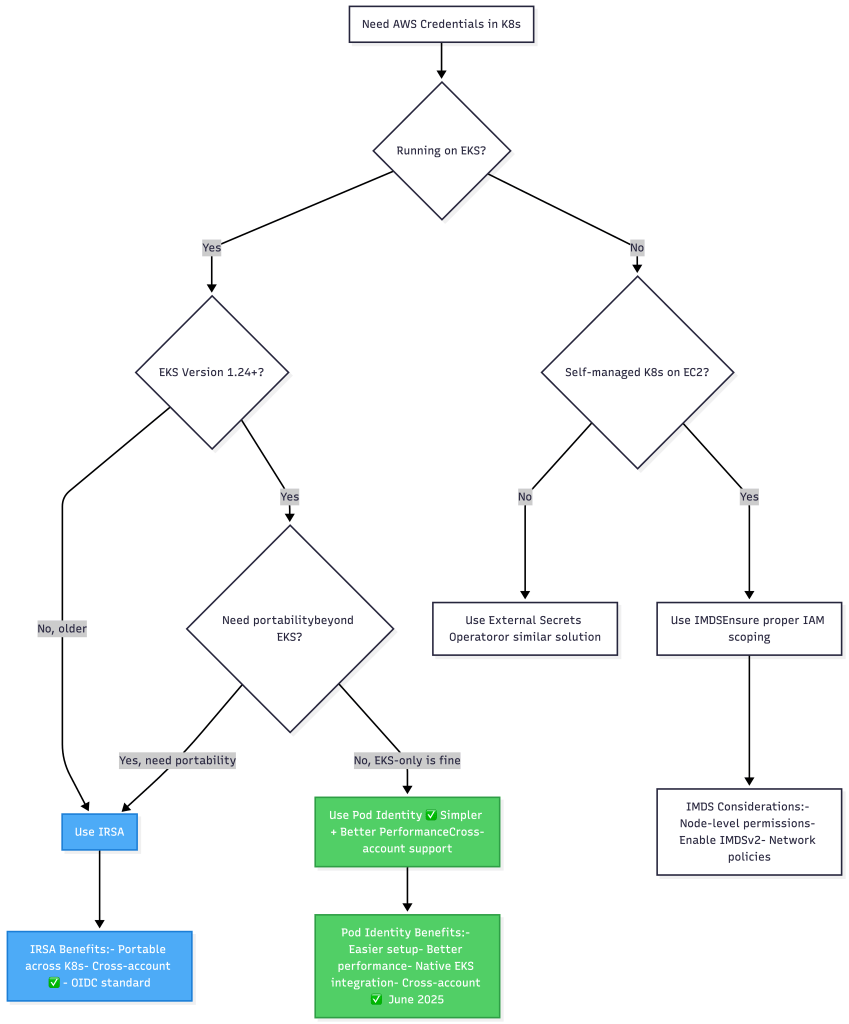
The Complete Precedence Decision Tree
Best Practices for Production
1. Choose Your Web Identity Mechanism
For new deployments on EKS 1.24+:
# Install Pod Identity add-on
eksctl create addon --name eks-pod-identity-agent --cluster my-cluster

# Create association
aws eks create-pod-identity-association \
  --cluster-name my-cluster \
  --namespace production \
  --service-account my-app-sa \
  --role-arn arn:aws:iam::123456789012:role/my-app-role
For cross-account or multi-cloud:
# Use IRSA with OIDC provider
eksctl utils associate-iam-oidc-provider --cluster my-cluster --approve

# Create role with trust policy
# Then annotate ServiceAccount
2. Enforce with Admission Control
# Pseudocode for admission webhook
function validatePod(pod):
    hasEnvCreds = pod has AWS_ACCESS_KEY_ID env var
    hasWebIdentity = pod.serviceAccount has role-arn annotation OR
                     pod identity association exists

    if hasEnvCreds and hasWebIdentity:
        return DENY: "Cannot mix env credentials with Web Identity"

    if production namespace and not hasWebIdentity:
        return DENY: "Production pods must use IRSA or Pod Identity"

    return ALLOW
3. Clean Dockerfile Hygiene
FROM golang:1.21 as builder
WORKDIR /app
COPY . .
RUN go build -o myapp

FROM gcr.io/distroless/base-debian12

# CRITICAL: No AWS credentials in ENV
# CRITICAL: No .aws directories in image

COPY --from=builder /app/myapp /

# Disable IMDS fallback (optional but recommended)
ENV AWS_EC2_METADATA_DISABLED=true

ENTRYPOINT ["/myapp"]
4. Application-Level Validation
func initAWSClient(ctx context.Context) (*aws.Config, error) {
    cfg, err := config.LoadDefaultConfig(ctx)
    if err != nil {
        return nil, err
    }

    // Verify we're using expected credentials
    creds, err := cfg.Credentials.Retrieve(ctx)
    if err != nil {
        return nil, err
    }

    // In production, enforce Web Identity
    if os.Getenv("ENV") == "production" {
        if creds.Source != "WebIdentityTokenProvider" {
            return nil, fmt.Errorf(
                "production requires Web Identity (IRSA/Pod Identity), got: %s",
                creds.Source,
            )
        }

        // Log which mechanism is being used
        if os.Getenv("AWS_CONTAINER_CREDENTIALS_FULL_URI") != "" {
            log.Info("Using EKS Pod Identity")
        } else {
            log.Info("Using IRSA")
        }
    }

    return &cfg, nil
}
5. Monitor with CloudWatch
Set up alerts for unexpected credential usage:
-- CloudWatch Logs Insights Query
fields @timestamp, userIdentity.arn, sourceIPAddress
| filter userIdentity.arn not like /expected-role-name/
| filter eventSource = "s3.amazonaws.com"
| stats count() by userIdentity.arn
Real-World Architecture Pattern
Here’s how we structure credentials across different environments:

Our migration strategy:
- New services: Start with Pod Identity (EKS 1.24+)
- Existing IRSA: Keep as-is, migrate opportunistically
- Legacy IMDS: Migrate to Pod Identity with tight timelines
- Dev environments: Allow IMDS with minimal permissions
Troubleshooting Flowchart

Summary: The Modern Precedence Pyramid
Remember the credential chain as a pyramid—the SDK checks from top to bottom and stops at the first layer it finds:
Golden Rules
- In production, use Web Identity exclusively (IRSA or Pod Identity)
- Never set AWS_ACCESS_KEY_ID in production — it shadows everything
- Choose Pod Identity for new EKS 1.24+ deployments — simpler and faster
- Use IRSA when you need cross-account access — more flexible trust policies
- Explicitly disable IMDS when using Web Identity to prevent fallback
- Validate credentials at app startup — fail fast if not using expected source
- Monitor CloudTrail for unexpected IAM ARNs making API calls
- Don’t mix IRSA and Pod Identity on the same ServiceAccount
IRSA vs Pod Identity: Quick Reference
| Feature | IRSA | Pod Identity |
|---|---|---|
| EKS Version | Any | 1.24+ |
| Setup | OIDC provider + annotation | Add-on + association |
| Configuration | ServiceAccount annotation | AWS CLI/API association |
| Token Location | /var/run/secrets/eks.../token | /var/run/secrets/pods.eks.../token |
| Credential Flow | Pod → STS | Pod → Agent → EKS Pod Identity Service |
| Performance | Good (STS roundtrip) | Better (local agent) |
| Cross-Account | ✅ Built-in | ✅ Native (June 2025) |
| Portability | ✅ Any K8s with OIDC | ❌ EKS only |
| Complexity | Medium | Low |
| Best For | Multi-cloud, portability needs | EKS-native deployments, simplicity |
The credential chain is powerful but unforgiving. Understanding precedence isn’t just about making things work—it’s about preventing silent security violations that only show up in your audit logs weeks later. With the addition of Pod Identity, you now have more options than ever, but the fundamental principle remains: first match wins, and environment variables always win first.
What’s your biggest credential challenge? Are you using IRSA, Pod Identity, or planning a migration? I’m happy to review specific scenarios in the comments.
NotebookLM Link.
 Platformwale
Leave a comment